Kubernetes Security Basics: How Container Isolation Actually Works
Container security fails when you trust the kernel; true protection requires verifying every layer from image build to runtime execution.
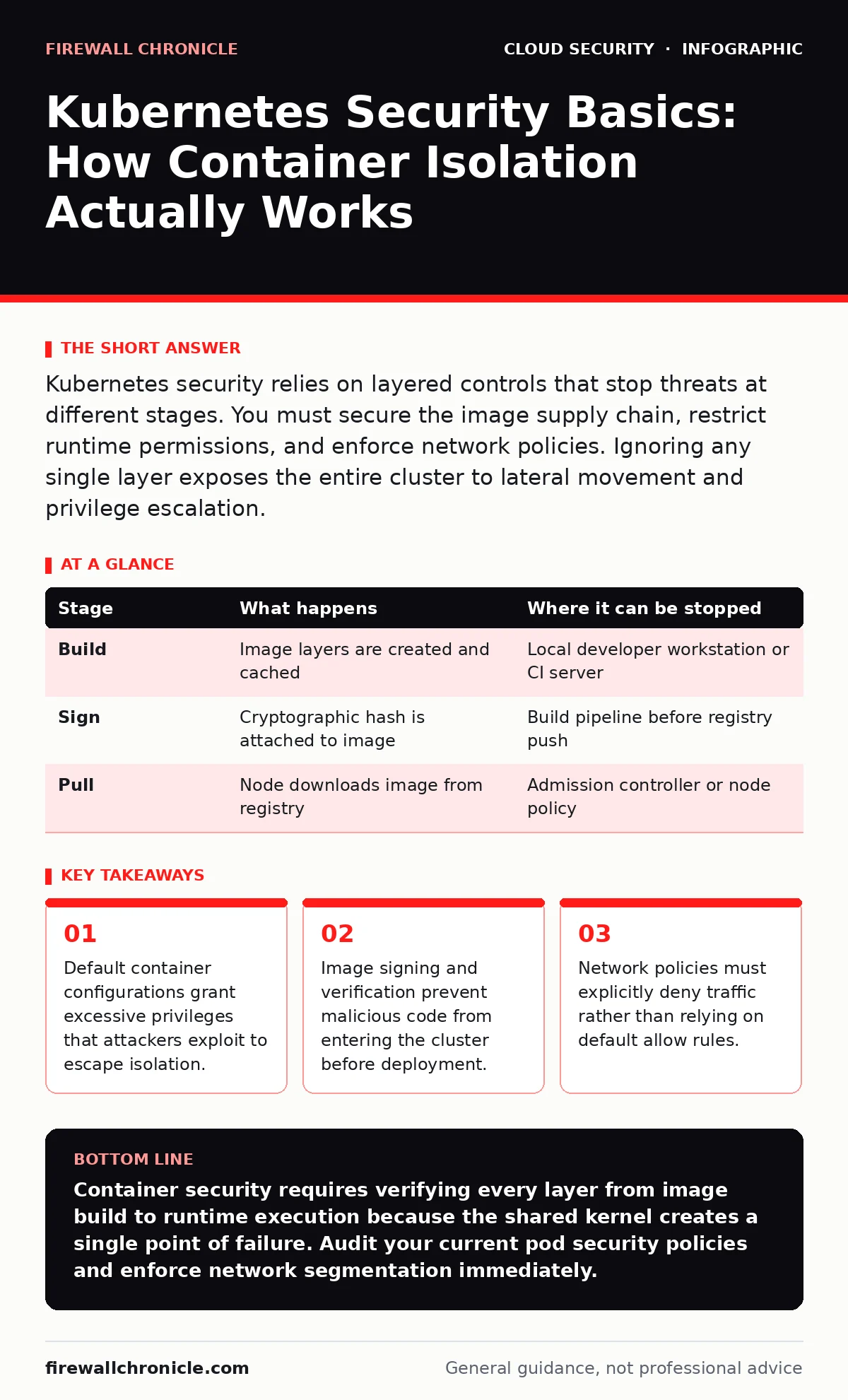
Kubernetes security relies on layered controls that stop threats at different stages. You must secure the image supply chain, restrict runtime permissions, and enforce network policies. Ignoring any single layer exposes the entire cluster to lateral movement and privilege escalation.
The Illusion of Container Isolation
Containers are not virtual machines. They share the host kernel, which means a vulnerability in the kernel affects every container running on that node. You often hear that containers are isolated, but this isolation depends entirely on the host operating system remaining uncompromised. If an attacker gains root access inside a container, they may pivot to the host if the container is configured incorrectly.
This shared kernel architecture creates a specific risk profile. Unlike virtual machines, where the hypervisor provides a thick barrier, containers rely on Linux namespaces and control groups. Namespaces isolate process trees, network stacks, and file system views. Control groups limit resource usage. If either mechanism is misconfigured, the boundary between the container and the host dissolves.
Stage 1: Image Supply Chain Integrity
Security begins before the container ever runs. You build images from layers, and each layer can contain secrets, vulnerabilities, or backdoors. If you pull an image from a public registry without verification, you are trusting a stranger with your infrastructure. The supply chain is the first line of defense because once a malicious image is running, containment becomes significantly harder.
You must treat image artifacts as code. This means signing images cryptographically and verifying those signatures before admission. If the signature does not match the trusted key, the image is rejected. This prevents an attacker from injecting a compromised image into your deployment pipeline. It also stops accidental deployments of untested builds.
| Stage | What happens | Where it can be stopped |
|---|---|---|
| Build | Image layers are created and cached | Local developer workstation or CI server |
| Sign | Cryptographic hash is attached to image | Build pipeline before registry push |
| Pull | Node downloads image from registry | Admission controller or node policy |
Stage 2: Admission Control and Policy
Once an image is selected, the Kubernetes API server decides whether to allow the pod to start. This is where admission controllers operate. They intercept requests before the object is persisted in etcd. If the configuration violates your security policies, the request is denied. This stage prevents insecure configurations from ever reaching a node.
You should enforce policies that restrict privileged containers. A privileged container has full access to the host’s devices and kernel capabilities. This is rarely necessary for application workloads. By default, many distributions allow privileged mode, which is a dangerous default. You must explicitly disable it and require non-root users for all containers.
See Kubernetes RBAC for details on how role-based access control limits who can create these privileged pods. Without proper RBAC, any user with cluster access can bypass admission controls by modifying the policies themselves.
Stage 3: Runtime Privilege Management
Even if a pod is admitted, it runs with specific capabilities. Linux capabilities break down the root privilege into smaller units. By default, containers often retain capabilities like NET_RAW or SYS_ADMIN that they do not need. Each unnecessary capability increases the attack surface. If a vulnerability is found in a library that uses NET_RAW, the attacker can craft network packets to bypass firewalls.
You must drop all capabilities and add only those strictly required. For example, a web server needs NET_BIND_SERVICE to listen on ports below 1024. It does not need SYS_PTRACE to debug other processes. This principle of least privilege limits what an attacker can do if they compromise the application logic.
Stage 4: Network Segmentation and Flow
Containers within a cluster can talk to each other by default. This flat network model allows an attacker who compromises one pod to scan and attack every other pod. This lateral movement is the primary reason small breaches become large outages. You must treat the internal cluster network as untrusted, just like the public internet.
Network policies define which pods can communicate with which other pods. You create rules that specify allowed source and destination labels. If no policy matches, the traffic is denied. This requires you to map out your application’s communication patterns explicitly. It is not enough to assume that services in the same namespace can talk freely.
Consider cloud network segmentation as a broader context for this strategy. Segmenting workloads at the cloud provider level adds another layer of defense, but internal Kubernetes network policies are faster and more granular.
See also: Mutable vs Immutable Infrastructure: Why State Changes Break Security · Multi Cloud Security Challenges: How to Stop Config Drift
Stage 5: Secret Management and Storage
Applications need credentials to function. Storing these credentials in environment variables is insecure because they can be leaked through logs, process listings, or debugging tools. Kubernetes secrets are stored in etcd, which is often unencrypted by default. If an attacker gains access to etcd, they can read all secrets in the cluster.
You must encrypt secrets at rest in etcd. This requires configuring an encryption provider that uses a key separate from the cluster’s data encryption key. Additionally, you should avoid storing sensitive data in the container image itself. Use a secrets manager or a vault integration to inject credentials at runtime. This ensures that the secret never exists on disk in plain text.
Stage 6: Monitoring and Anomaly Detection
Security is not a static state. Attackers evolve their techniques to bypass static controls. You must monitor runtime behavior to detect anomalies. Look for unexpected process executions, unusual network connections, or sudden spikes in resource usage. These indicators often signal that a container has been compromised.
You should deploy agents that collect system calls and network events. Compare these events against a baseline of normal behavior. If a web server starts executing a shell command, that is a deviation from the baseline. Alerting on such deviations allows you to respond before the attacker exfiltrates data or moves laterally.
Review cloud cryptojacking to understand how attackers monetize compromised containers. They often install mining software that consumes CPU resources. Monitoring for high CPU usage on idle containers can reveal this activity early.
Applying the Layers in Practice
You cannot secure Kubernetes by focusing on one stage. Each layer compensates for the weaknesses of the others. If admission control fails, runtime restrictions limit the damage. If runtime restrictions are bypassed, network segmentation prevents lateral movement. This defense-in-depth approach ensures that no single failure leads to total compromise.
Start by auditing your current configurations. Identify privileged containers and remove that privilege. Implement network policies for your most critical services. Verify that your images are signed and that secrets are encrypted. This systematic approach reduces risk without stopping development velocity.
Key takeaways
- Default container configurations grant excessive privileges that attackers exploit to escape isolation.
- Image signing and verification prevent malicious code from entering the cluster before deployment.
- Network policies must explicitly deny traffic rather than relying on default allow rules.
Container security requires verifying every layer from image build to runtime execution because the shared kernel creates a single point of failure. Audit your current pod security policies and enforce network segmentation immediately.
Frequently asked questions
Do I need to encrypt all data in my Kubernetes cluster?
You must encrypt secrets at rest in etcd and use TLS for inter-service communication. Encrypting all application data depends on your compliance requirements and sensitivity of the data.
How do I prevent containers from escaping to the host?
Run containers as non-root users, drop all Linux capabilities, and do not mount host filesystems. Use seccomp profiles to restrict system calls.
Is scanning images enough to secure my supply chain?
No. Scanning finds known vulnerabilities but not logic flaws or zero-days. You must also sign images and verify signatures to ensure integrity and origin.
What is the biggest risk in Kubernetes networking?
The default allow-all network policy allows lateral movement. You must explicitly deny traffic between pods unless a specific policy allows it.
How this guide was produced: written by the Firewall Chronicle editorial team with AI assistance, checked against the public references listed below, and reviewed when the facts change. See our editorial policy or report an error.