How Man-in-the-Middle Attacks Intercept Your Data Step by Step
You assume your connection is private, but the attacker sits invisibly between your device and the server, rewriting packets in real time without either side knowing.
An attacker positions themselves between two communicating parties, often by compromising a local network or using DNS spoofing. They decrypt traffic, read or alter the data, and re-encrypt it before forwarding it. The attack succeeds when you cannot verify the identity of the endpoint you believe you are contacting.
The Illusion of Direct Communication
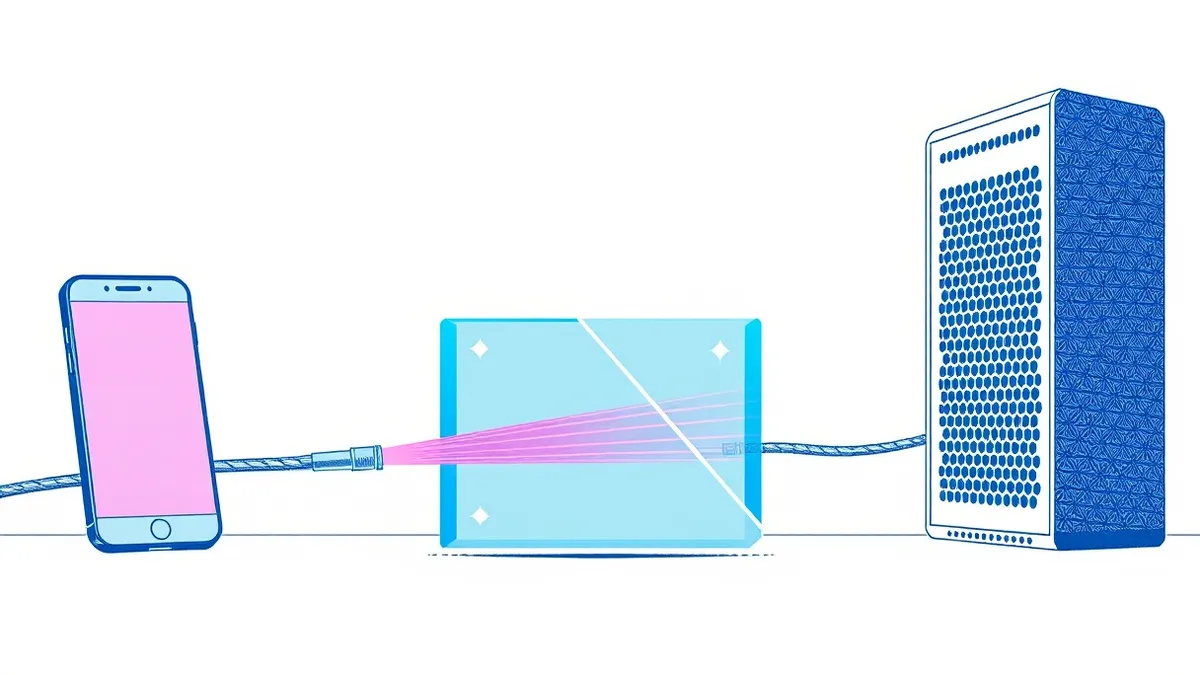
You believe your web browser speaks directly to a website server. In reality, data packets travel through multiple routers and switches. A man-in-the-middle attack exploits this transit path. The attacker does not need to break into your computer or the server. They simply insert themselves into the communication channel.
This insertion relies on the assumption that the path is trusted. If you connect to an open Wi-Fi network, you implicitly trust every other device on that network. The attacker leverages this trust to position their device as a bridge. They receive your data, inspect it, and forward it to the intended recipient. The recipient replies, and the attacker forwards the response back to you. To you, the connection feels normal. The latency might increase slightly, but the content appears intact.
Stage 1: Network Reconnaissance and Positioning
The attacker begins by identifying a target network. They look for environments where users connect without strong authentication. Public Wi-Fi hotspots are common targets because users often skip security prompts. The attacker sets up a rogue access point that mimics a legitimate network name. Alternatively, they use ARP spoofing. Address Resolution Protocol maps IP addresses to MAC addresses. By broadcasting fake ARP messages, the attacker convinces your device that their MAC address belongs to the gateway.
Your device sends data to what it believes is the router. The attacker’s machine receives it. This stage is passive for you. You see no error messages. You see no warning signs. The network appears to function correctly. The attacker now controls the flow of traffic entering and leaving your device.
Stage 2: Traffic Interception and Decryption
Once the attacker controls the traffic flow, they can intercept packets. If the traffic is unencrypted, such as standard HTTP, the attacker can read every character. They see login credentials, personal messages, and financial data. However, most modern applications use TLS, Transport Layer Security. This encrypts the data.
To bypass this, the attacker performs an active interception. They initiate a separate TLS connection with the server on your behalf. They also initiate a TLS connection with your device. They act as a proxy. Your device thinks it is talking to the server. The server thinks it is talking to your device. The attacker sits in the middle, decrypting the data from one side, reading or modifying it, and re-encrypting it for the other side. This is known as a SSL stripping attack or a TLS interception attack.
Stage 3: Identity Impersonation
The success of Stage 2 depends on your device accepting the attacker’s certificate. Browsers and operating systems validate certificates using trusted Certificate Authorities. If the attacker presents a certificate signed by a trusted CA, your device accepts it. This can happen if the attacker uses a stolen certificate or if your device has been pre-compromised with a malicious root certificate.
If your device strictly validates the certificate chain, the attack fails. You will see a security warning. Many users ignore these warnings. This human factor is often the final barrier. The attacker relies on your willingness to bypass security alerts to proceed with the transaction.
Stage 4: Data Manipulation and Exfiltration
With the connection established and encrypted traffic decrypted, the attacker can manipulate the data. They can change the destination IP address in a DNS response. This is DNS spoofing. Your request for a legitimate site is redirected to a malicious server controlled by the attacker. They can also inject scripts into web pages. This allows them to steal session cookies or keylog your inputs.
The attacker may also alter the data sent to the server. For example, they could change the amount in a financial transaction. If the server does not perform strict integrity checks, it processes the altered request. The attacker then forwards the server’s response to you, perhaps modifying it to hide the fraud. You see a confirmation of the original amount. The server processes the altered amount. The discrepancy is hidden by the attacker’s interception.
See also: Port Scan Response: Containment, Recovery, and Prevention Steps · VPN Gateway and ADC Vulnerabilities: The Hidden Risks in Network Perimeters
Technical Defenses and Interruption Points
You can interrupt this process at several stages. The first is at the network level. Using a VPN, Virtual Private Network, encrypts all traffic before it leaves your device. This prevents local attackers from reading unencrypted traffic. However, a VPN does not protect against an attacker who can also decrypt the VPN traffic or who sits beyond the VPN endpoint.
The second defense is certificate validation. Browsers should reject self-signed certificates. You should never ignore certificate warnings. For developers, implementing certificate pinning is effective. This binds a public key to a specific server. If the attacker presents a different key, even if it is signed by a trusted CA, the connection is rejected. This prevents the impersonation stage from succeeding.
The Role of Protocol Hygiene
Protocols like HTTP/2 and HTTP/3 add layers of complexity. They multiplex requests, which can complicate inspection. However, they do not solve the trust problem. If you cannot trust the endpoint, the protocol features are irrelevant. You must ensure that the initial handshake is secure.
Network segmentation can also limit the impact. If an attacker compromises one segment of the network, they cannot easily intercept traffic from other segments. This reduces the attack surface. Rate limiting can help detect anomalous traffic patterns that might indicate an active interception attempt.
Verification Beyond the Lock Icon
The padlock icon does not mean the site is safe. It only means the connection is encrypted. It does not guarantee the identity of the server. You must look at the domain name. Phishing sites often use domains that look similar to legitimate ones. One character difference is enough to deceive.
Social engineering plays a role here. Attackers craft scenarios where users are rushed or confused. They might send an email urging immediate action. This pressures users to bypass security warnings. Understanding these tactics helps you resist the urge to click through.
For sensitive operations, consider using hardware security keys. These devices perform cryptographic operations locally. They bind the authentication to the specific domain. Even if an attacker intercepts the traffic, they cannot replicate the cryptographic signature generated by the key for a different domain. This adds a layer of verification that is difficult to bypass.
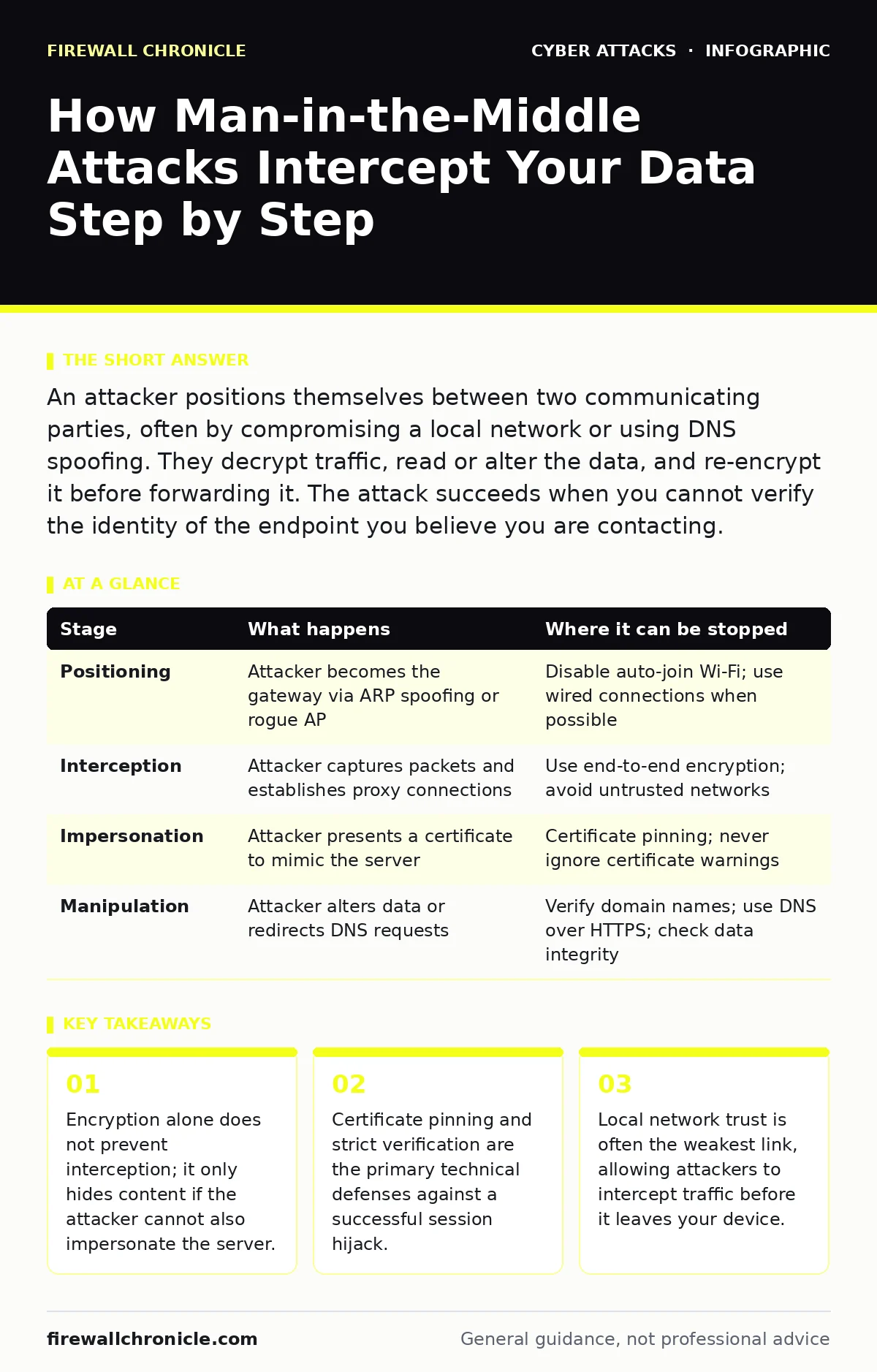
| Stage | What happens | Where it can be stopped |
|---|---|---|
| Positioning | Attacker becomes the gateway via ARP spoofing or rogue AP | Disable auto-join Wi-Fi; use wired connections when possible |
| Interception | Attacker captures packets and establishes proxy connections | Use end-to-end encryption; avoid untrusted networks |
| Impersonation | Attacker presents a certificate to mimic the server | Certificate pinning; never ignore certificate warnings |
| Manipulation | Attacker alters data or redirects DNS requests | Verify domain names; use DNS over HTTPS; check data integrity |
Key takeaways
- Encryption alone does not prevent interception; it only hides content if the attacker cannot also impersonate the server.
- Certificate pinning and strict verification are the primary technical defenses against a successful session hijack.
- Local network trust is often the weakest link, allowing attackers to intercept traffic before it leaves your device.
Frequently asked questions
Can a VPN stop a man-in-the-middle attack?
A VPN encrypts traffic between your device and the VPN server, protecting you from local network snooping. It does not protect you if the attacker is located between the VPN server and the final destination, or if they can decrypt the VPN traffic itself.
Why does my browser still show a green lock when I am being attacked?
The lock indicates that the connection is encrypted, not that the site is legitimate. If the attacker presents a valid certificate, your browser will show the lock. You must verify the domain name manually to ensure you are on the correct site.
How do I know if my device has a malicious root certificate?
Check your device’s trusted certificate store. Look for certificates that you did not install yourself or that belong to unknown entities. On mobile devices, this often happens if you have installed a management profile from an untrusted source.
Does using HTTPS prevent all man-in-the-middle attacks?
No. HTTPS encrypts the data, but if an attacker can impersonate the server with a valid certificate, they can decrypt and read the traffic. You need additional verification methods, such as certificate pinning or hardware keys, to fully mitigate this risk.
How this guide was produced: written by the Firewall Chronicle editorial team with AI assistance, checked against the public references listed below, and reviewed when the facts change. See our editorial policy or report an error.