Browser Updates: Why Silent Patches Fail and How to Fix Them
Automatic updates often miss critical security fixes because background processes lack the necessary permissions to modify core system files.
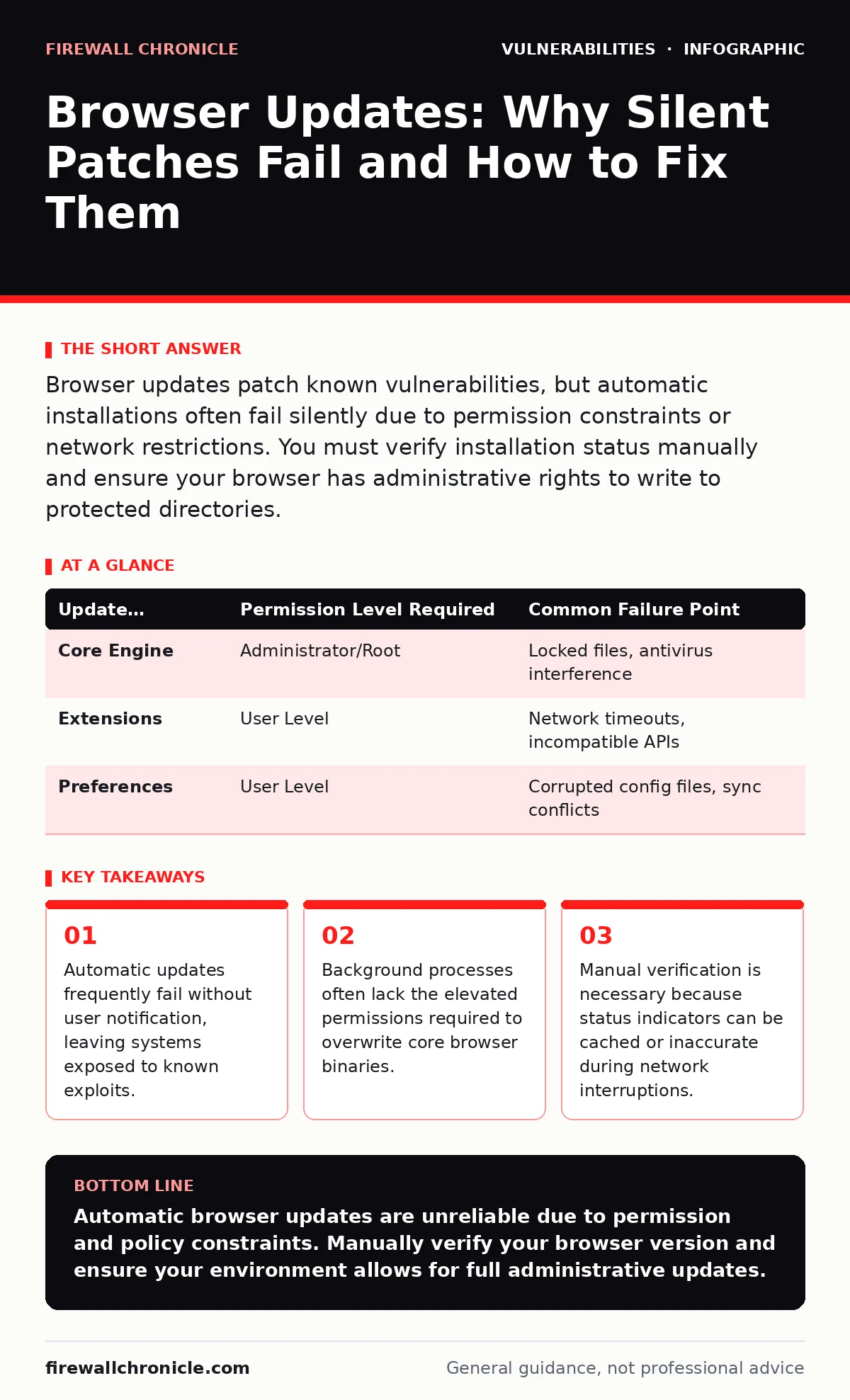
Browser updates patch known vulnerabilities, but automatic installations often fail silently due to permission constraints or network restrictions. You must verify installation status manually and ensure your browser has administrative rights to write to protected directories.
Why do automatic updates fail silently?
Automatic updates fail silently because the background service lacks the necessary permissions to modify protected system files. Modern operating systems restrict write access to directories containing core applications to prevent malware from altering them. If the update service runs under a standard user context, it cannot replace the existing browser binary. The update may download successfully but stall during the installation phase.
This creates a false sense of security. The browser displays a status of "up to date" because the download completed, even though the new code never executed. You remain vulnerable to exploits that were patched in the downloaded version.
How do browsers verify update integrity?
Browsers use cryptographic signatures to verify that update packages have not been tampered with. When an update is downloaded, the client checks the digital signature against a trusted public key stored in the application. If the signature does not match, the installation is aborted. This prevents attackers from injecting malicious code into the update stream.
However, this mechanism relies on the integrity of the initial installation. If the base browser was compromised before the update process began, the validation logic itself may be trusted incorrectly. This is why initial source trust matters as much as the update verification.
What happens when a browser is managed by an organization?
Organizational policies often override local update settings to maintain stability across fleets. Group Policy Objects or Mobile Device Management systems can defer updates for weeks or months. This allows IT teams to test compatibility with internal tools before deployment. The trade-off is a wider window of exposure to newly disclosed vulnerabilities.
Developers working in these environments should not assume their local environment is patched just because the vendor released a fix. The policy engine controls the timeline, not the user.
Why do some updates require a full restart?
Some updates require a full restart because the browser engine is actively using memory-mapped files that cannot be overwritten while in use. The operating system locks these files to prevent data corruption. The browser must close all processes, including background helper services, to release these locks.
Partial updates may apply only to non-critical components. Critical security patches for the rendering engine or JavaScript interpreter often require a complete shutdown. If you keep background tabs open, the update may never apply.
How do sandboxing restrictions affect updates?
Sandboxing restricts what the browser can do, including which files it can write to. This isolation prevents a compromised web page from modifying the browser itself. However, it also prevents the browser from updating its own core files without assistance. The update must be handled by a privileged helper process outside the sandbox.
If this helper process is disabled or blocked by security software, the update fails. The sandbox protects you from web threats but can hinder self-repair mechanisms.
See also: Browser Hijackers: How They Persist and How to Evict Them
What is the risk of outdated extensions?
Outdated extensions can bypass browser security controls even if the browser itself is current. Extensions often have elevated privileges, allowing them to read cookies, modify DOM structures, or intercept network requests. If an extension contains a vulnerability, it provides a direct path to the user's session.
The browser update process rarely checks extension versions. You must manage extension updates separately. A current browser with an outdated extension is as vulnerable as an outdated browser.
How do memory corruption bugs impact updates?
Memory corruption bugs allow attackers to execute arbitrary code by overflowing buffers. Browser updates frequently patch these low-level errors in the rendering engine. If you do not apply the update, the attacker can use a crafted web page to crash the browser or gain control of the process.
This is particularly dangerous because the exploit can be delivered via a legitimate website that loads a malicious image or script. The browser update is the primary defense against these low-level attacks.
Why do some updates seem to revert settings?
Some updates revert settings to default values to ensure a clean state after major architectural changes. This can disable previously allowed permissions for local files or change default security levels. The browser prioritizes security over user convenience in these cases.
You must review your settings after major updates. Features that were previously allowed may now be blocked, breaking local development workflows or internal tools.
| Update Component | Permission Level Required | Common Failure Point |
|---|---|---|
| Core Engine | Administrator/Root | Locked files, antivirus interference |
| Extensions | User Level | Network timeouts, incompatible APIs |
| Preferences | User Level | Corrupted config files, sync conflicts |
How do you verify an update was successful?
You verify an update by checking the version string in the browser's settings menu. Compare this string to the official release notes from the vendor. Do not rely on the notification banner, which may disappear after the download completes.
If the version number has not changed, the installation failed. You may need to manually trigger the update or repair the installation.
What if the browser refuses to update?
If the browser refuses to update, check for conflicting software or corrupted installation files. Antivirus programs may quarantine the new binaries, preventing installation. You may need to add an exclusion for the browser's installation directory.
If the issue persists, perform a clean reinstall. This removes corrupted configuration files that may be blocking the update process. Ensure you back up your bookmarks and passwords before doing so.
How do updates relate to cross-site scripting (XSS)?
Browser updates often include fixes for how the rendering engine handles untrusted input. Cross-site scripting (XSS) vulnerabilities allow attackers to inject malicious scripts into web pages. Modern browsers implement strict content security policies and sandboxing to mitigate these attacks.
Updates refine these defenses. An outdated browser may lack the latest heuristics to detect and block sophisticated XSS attempts. Keeping the browser current ensures you have the latest detection logic.
What is the impact on server-side template injection?
While server-side template injection is a server-side vulnerability, browser updates can mitigate the impact. Modern browsers restrict what data can be sent to the server and how responses are interpreted. This reduces the attack surface for injection attacks.
However, the primary defense is proper output encoding on the server. Browser updates provide a secondary layer of protection by limiting the damage an exploit can cause.
How do race condition vulnerabilities affect updates?
Race condition vulnerabilities occur when two processes access shared resources simultaneously. Browser updates can patch these conditions in the way the browser handles concurrent network requests or file operations.
If you do not update, an attacker may exploit a race condition to bypass security checks. This can lead to privilege escalation or data leakage. The update ensures the browser handles concurrent operations in a secure, deterministic manner.
What about XML external entity (XXE) attacks?
XML external entity (XXE) attacks exploit how parsers process XML data. Browser updates often include stricter defaults for XML parsing, disabling external entity resolution by default. This prevents attackers from reading local files or performing server-side request forgery.
An outdated browser may allow these dangerous features, making it easier for an attacker to extract sensitive data. The update enforces safer parsing standards.
How do updates help with fuzz testing?
Fuzz testing involves sending random or malformed data to a program to find crashes. Browser vendors use fuzz testing to discover memory corruption bugs and other vulnerabilities. Updates incorporate fixes for these discovered issues.
By keeping your browser updated, you benefit from the findings of extensive fuzz testing campaigns. This reduces the likelihood of encountering a crash that could be exploited for code execution.
What is the role of output encoding in browser security?
Output encoding ensures that data sent to the browser is interpreted correctly, preventing injection attacks. While this is primarily a server-side responsibility, browser updates can improve how the browser handles improperly encoded data.
Modern browsers may reject or sanitize malformed input, providing a defense-in-depth strategy. However, relying on the browser to fix bad encoding is not a substitute for proper server-side validation.
How do VPN appliance vulnerabilities relate to browser updates?
VPN appliance vulnerabilities are separate from browser updates, but they can affect your connection security. If your VPN appliance is compromised, an attacker may intercept your traffic, including update requests.
Ensure your VPN configuration is secure and up to date. A compromised VPN can undermine the integrity of your browser updates by injecting malicious code into the update stream.
What should you do if you suspect a compromise?
If you suspect a compromise, disconnect from the network and change your passwords. Then, perform a clean reinstall of the browser. This removes any persistent malware that may have infected the installation.
Do not simply update the browser, as the malware may have modified the update mechanism. A fresh install ensures you start with a known good state.
Key takeaways
- Automatic updates frequently fail without user notification, leaving systems exposed to known exploits.
- Background processes often lack the elevated permissions required to overwrite core browser binaries.
- Manual verification is necessary because status indicators can be cached or inaccurate during network interruptions.
Automatic browser updates are unreliable due to permission and policy constraints. Manually verify your browser version and ensure your environment allows for full administrative updates.
Frequently asked questions
Do I need to restart my computer after a browser update?
Usually no. Most browsers restart their own processes automatically. However, if the update involves core system components, a full system restart may be required.
Can I use an older browser version for compatibility?
You can, but you will lose security patches. Older versions contain known vulnerabilities that can be exploited. Use isolated environments for testing legacy compatibility.
How often should I check for updates?
You should check for updates every time you open the browser. Relying on automatic updates is risky because they may fail silently.
Do extensions slow down browser updates?
Yes. Extensions can interfere with the update process by locking files or blocking network requests. Disable extensions during major updates to ensure success.
How this guide was produced: written by the Firewall Chronicle editorial team with AI assistance, checked against the public references listed below, and reviewed when the facts change. See our editorial policy or report an error.