Browser Hijackers: How They Persist and How to Evict Them
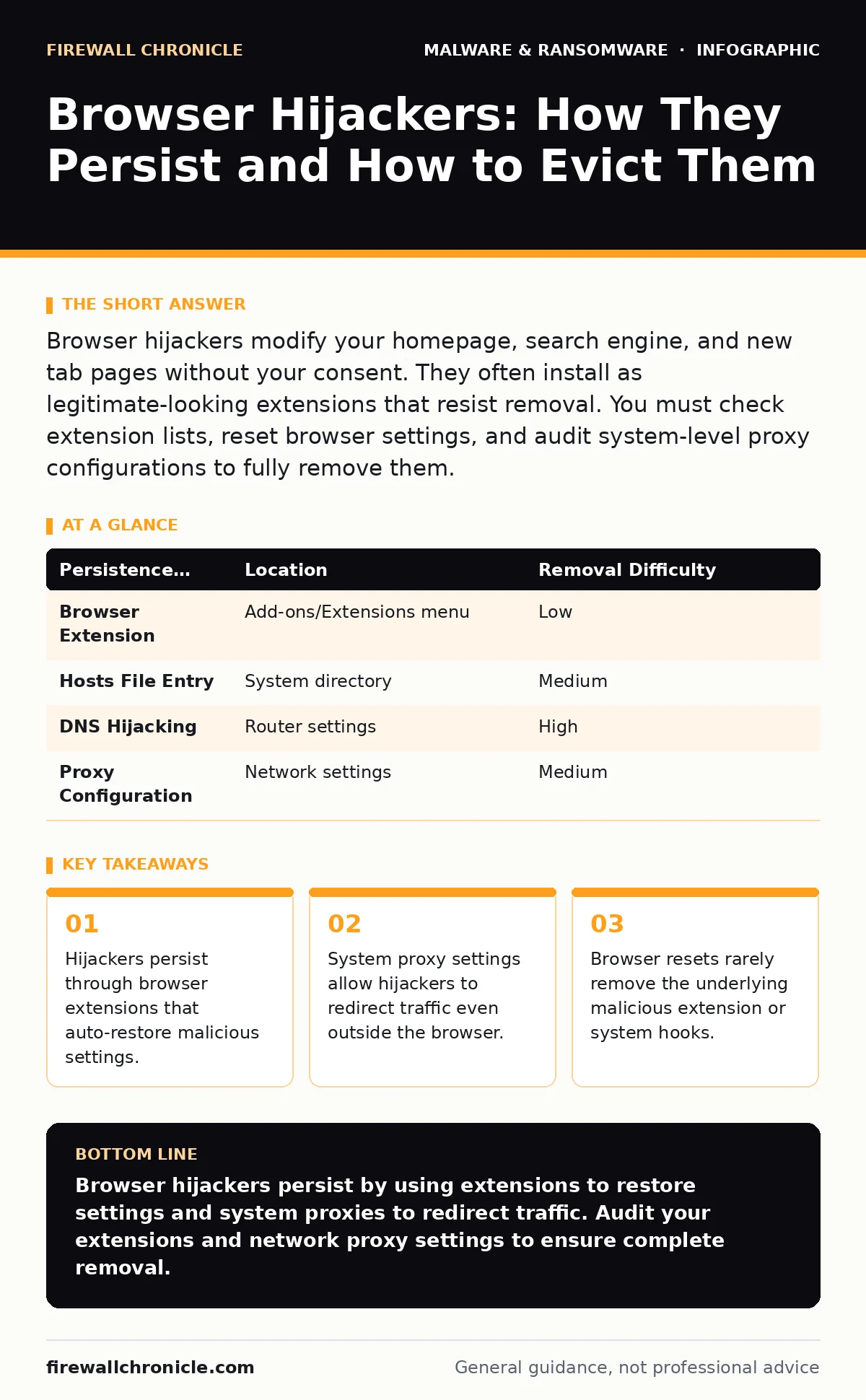
Browser hijackers often survive by installing browser extensions that regenerate settings even after you reset the browser configuration to its defaults.
Browser hijackers modify your homepage, search engine, and new tab pages without your consent. They often install as legitimate-looking extensions that resist removal. You must check extension lists, reset browser settings, and audit system-level proxy configurations to fully remove them.
What is a browser hijacker?
A browser hijacker is software that alters your browser settings to redirect your traffic to specific websites, usually for advertising revenue. It changes your homepage, new tab page, and default search provider without your explicit permission. Unlike ransomware, it does not encrypt your files, but it degrades your browsing experience and privacy.
How do browser hijackers get installed?
They typically arrive through software bundling or deceptive download prompts. When you install free software, a checkbox may be pre-selected to install a companion toolbar or search assistant. You might also click a "Download Now" button that is actually an ad for the hijacker. These installers rely on your speed and inattention rather than technical exploitation.
Why does the hijacker return after a reset?
Most users perform a browser reset to clear hijackers, but this action often fails to remove the root cause. The hijacker installs a browser extension that monitors your settings and re-applies the changes immediately after the reset. This extension survives the reset because it is treated as a legitimate plugin. You must remove the extension before the reset takes permanent effect.
| Persistence Method | Location | Removal Difficulty |
|---|---|---|
| Browser Extension | Add-ons/Extensions menu | Low |
| Hosts File Entry | System directory | Medium |
| DNS Hijacking | Router settings | High |
| Proxy Configuration | Network settings | Medium |
How can I see if my traffic is being redirected?
Check your browser’s extension list for tools you do not recognize or no longer use. Look for extensions with generic names like "Search Helper" or "PDF Converter" that you did not intentionally install. If your search results show sponsored links for unrelated products at the top, your traffic is likely being intercepted.
Why does changing my browser settings not help?
Some hijackers modify your system’s proxy settings instead of the browser itself. A proxy acts as an intermediary for your network requests. If the proxy points to a malicious server, all web traffic from every browser on your machine gets redirected. Changing browser settings has no effect because the traffic never leaves the proxy correctly.
See also: Browser Updates: Why Silent Patches Fail and How to Fix Them
How do I check for system-level redirection?
Open your operating system’s network settings and look for a proxy configuration. If you see a manual proxy address listed that you did not set, a hijacker is controlling your traffic. Clear this setting to restore direct internet access. This step is necessary even if your browser appears clean.
Can a browser hijacker steal my data?
Standard hijackers focus on ad revenue and do not typically steal passwords or credit cards. However, they can capture your browsing history and search queries, building a profile of your interests. More advanced variants may inject malicious scripts into pages you visit, potentially leading to drive-by downloads. The primary risk is privacy loss and exposure to further malware.
What is the difference between a hijacker and a rootkit?
A hijacker operates at the application level, modifying browser settings and extensions. A rootkit operates at the system kernel level, hiding its presence from the operating system. Hijackers are easier to detect and remove because they leave visible traces in browser folders. Rootkits require specialized tools to detect because they hide their files and processes.
How do I prevent future infections?
Avoid installing software from untrusted sources and always choose custom installation options. This allows you to uncheck bundled software before it installs. Keep your browser and operating system updated to patch vulnerabilities that hijackers might exploit. Regularly audit your installed extensions and remove any you do not actively use.
Why does Microsoft Defender Antivirus sometimes miss hijackers?
Antivirus engines prioritize known malware signatures. Many hijackers are marketed as legitimate "browser helper" tools, so they lack malicious code signatures. They behave like normal extensions, making it difficult for signature-based detection to flag them. Behavioral analysis tools are better at catching these subtle deviations.
Key takeaways
- Hijackers persist through browser extensions that auto-restore malicious settings.
- System proxy settings allow hijackers to redirect traffic even outside the browser.
- Browser resets rarely remove the underlying malicious extension or system hooks.
Browser hijackers persist by using extensions to restore settings and system proxies to redirect traffic. Audit your extensions and network proxy settings to ensure complete removal.
Frequently asked questions
Can a browser hijacker encrypt my files?
No, browser hijackers do not encrypt files. They focus on redirecting web traffic and displaying advertisements. Ransomware is a separate category of malware that encrypts data.
Should I use a password manager to stop hijackers?
A password manager protects your credentials but does not prevent hijackers from installing. You still need to monitor extensions and network settings to stop the hijacker.
Do browser hijackers work on mobile devices?
Yes, mobile hijackers often arrive as apps that inject ads into web pages or change your default search engine. They are harder to remove because mobile operating systems restrict deep system access.
Is tamper protection effective against browser hijackers?
Tamper protection prevents malware from disabling your security software. It does not directly stop hijackers from installing, but it ensures your antivirus remains active to detect known malicious variants.
How this guide was produced: written by the Firewall Chronicle editorial team with AI assistance, checked against the public references listed below, and reviewed when the facts change. See our editorial policy or report an error.