Cloud Backup Benefits and Limitations for Modern Infrastructure
Cloud backup shifts recovery control from hardware capacity to API reliability, creating new failure modes that differ from traditional storage risks.
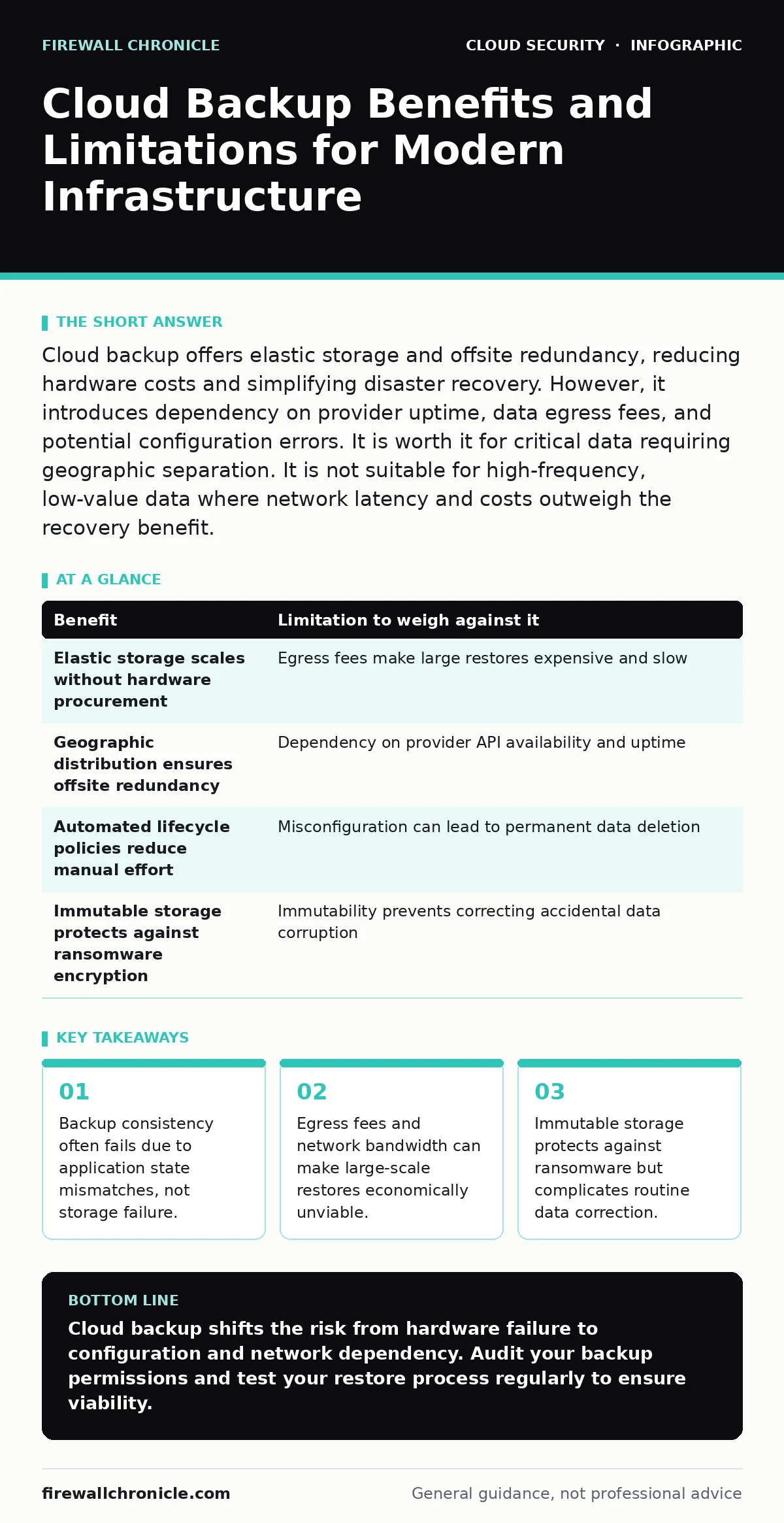
Cloud backup offers elastic storage and offsite redundancy, reducing hardware costs and simplifying disaster recovery. However, it introduces dependency on provider uptime, data egress fees, and potential configuration errors. It is worth it for critical data requiring geographic separation. It is not suitable for high-frequency, low-value data where network latency and costs outweigh the recovery benefit.
The Shift from Storage to State
Traditional backup strategies focused on copying bits from one disk to another. Cloud backup changes the problem from storage capacity to application state consistency. You are no longer just saving files; you are preserving a point-in-time snapshot of a running system. If the database transaction log is not flushed before the snapshot, the backup is corrupted. This is a silent failure mode. The backup exists, it passes integrity checks, but it cannot be restored to a functioning state.
Imagine a web application that writes to a local cache and a remote database simultaneously. A naive backup tool might capture the cache before the database update. Restoring this state creates a mismatch between what the application thinks it knows and what the database contains. This inconsistency causes application crashes upon restoration. You must understand the write-ahead log mechanism to ensure your backups capture a consistent transaction state.
The Economics of Data Gravity
Data gravity describes the difficulty of moving data as it grows in size and value. Cloud backup exploits the low cost of inbound data transfer. Uploading terabytes of data to a cloud provider is often free or very cheap. Downloading that same data, known as egress, incurs significant fees. This asymmetry creates a hidden cost in disaster recovery.
Suppose your primary site fails and you need to restore 50 terabytes of data from the cloud to a new infrastructure. The egress charges can exceed the cost of the backup storage itself. Furthermore, the speed of the restore is limited by your internet bandwidth. A 100 Mbps connection takes days to restore large datasets. This delay extends your downtime significantly. You must factor in both the financial cost and the time cost of data retrieval when evaluating cloud backup viability.
| Benefit | Limitation to weigh against it |
|---|---|
| Elastic storage scales without hardware procurement | Egress fees make large restores expensive and slow |
| Geographic distribution ensures offsite redundancy | Dependency on provider API availability and uptime |
| Automated lifecycle policies reduce manual effort | Misconfiguration can lead to permanent data deletion |
| Immutable storage protects against ransomware encryption | Immutability prevents correcting accidental data corruption |
The Consistency Challenge in Distributed Systems
Cloud environments are distributed by nature. A single application might run on multiple instances across different availability zones. Backing up such a system requires coordinated snapshots. If you snapshot Instance A before Instance B, the two instances may have divergent data states. Restoring them together creates a split-brain scenario.
Most cloud providers offer consistent snapshot groups that coordinate this process. However, these features are not always enabled by default. You must explicitly configure the backup tool to use these coordinated snapshots. Without them, your backup is a collection of individual states that may not work together. This is a common pitfall in complex architectures.
Security and the Principle of Least Privilege
Cloud backup agents require permissions to read your data. These permissions are often broader than necessary. A backup agent that has full read access to all buckets can be compromised and used to exfiltrate data. This turns your backup system into a lateral movement path for attackers.
You must apply the principle of least privilege to backup credentials. The backup agent should only have access to the specific resources it needs to back up. It should not have administrative rights. Additionally, encrypt data before it leaves your environment. Relying solely on the cloud provider’s encryption is risky if you share encryption keys with them. Use customer-managed keys to ensure that only you can decrypt the data.
Immutable Storage and Ransomware Defense
Ransomware attackers often target backups to ensure you cannot recover your data. Immutable storage objects cannot be modified or deleted for a set period. This feature provides a strong defense against ransomware. Even if an attacker gains access to your backup credentials, they cannot alter the immutable snapshots.
However, immutability is a double-edged sword. If you accidentally corrupt data and back it up, you cannot fix that backup until the immutability period expires. You must have a separate, non-immutable backup for routine corrections. This adds complexity to your backup strategy. You need two layers: one for rapid recovery of recent errors, and one for long-term protection against malicious deletion.
See also: Mutable vs Immutable Infrastructure: Why State Changes Break Security · Multi Cloud Security Challenges: How to Stop Config Drift
When It Is Worth It
Cloud backup is worth it when the cost of downtime exceeds the cost of storage and egress. Critical business applications, customer databases, and intellectual property fall into this category. These assets require geographic separation to protect against regional disasters. Cloud providers offer multiple regions, ensuring that a failure in one location does not destroy your data.
It is also worth it for compliance requirements. Many regulations mandate offsite backup and retention policies. Cloud providers offer automated lifecycle management that enforces these policies. This reduces the administrative burden of maintaining compliance. The automation ensures that backups are taken regularly and retained for the required period.
When It Is Not Worth It
Cloud backup is not worth it for high-volume, low-value data. Log files, temporary caches, and generated content can be recreated if lost. Backing up this data consumes storage and bandwidth without adding significant value. The cost of storing and retrieving this data outweighs the benefit of recovery.
It is also not suitable for real-time streaming data. Cloud backup is designed for point-in-time snapshots, not continuous data streams. Attempting to backup streaming data introduces latency and complexity. Use specialized streaming storage solutions for this use case. Cloud backup adds unnecessary overhead and potential points of failure.
Integrating with Cloud Security Posture
Your backup strategy must align with your overall cloud security posture. Consider how backup credentials interact with your identity management. Use single sign-on to manage access to backup consoles. Ensure that backup activities are logged and monitored for anomalies.
Network segmentation plays a role here too. The backup agent should operate within a isolated network segment. This limits the attack surface. If the agent is compromised, the attacker cannot easily move laterally to other systems. Review your cloud network segmentation policies to ensure they support secure backup operations.
For containerized workloads, ensure that your backup strategy accounts for the ephemeral nature of containers. Kubernetes security basics dictate that stateful data should be stored in persistent volumes. Back up these volumes, not the containers themselves. The containers can be recreated from images, but the data in the volumes cannot.
Key takeaways
- Backup consistency often fails due to application state mismatches, not storage failure.
- Egress fees and network bandwidth can make large-scale restores economically unviable.
- Immutable storage protects against ransomware but complicates routine data correction.
Cloud backup shifts the risk from hardware failure to configuration and network dependency. Audit your backup permissions and test your restore process regularly to ensure viability.
Frequently asked questions
How do I ensure my cloud backups are encrypted?
Enable server-side encryption provided by the cloud vendor for data at rest. For data in transit, use TLS connections. Consider using customer-managed encryption keys for an additional layer of control and security.
Can cloud backup protect against accidental deletion?
Yes, if you enable versioning or immutable storage. Versioning keeps previous copies of files, allowing you to recover deleted items. Immutable storage prevents deletion for a set period, protecting against both accidental and malicious removal.
What is the impact of data egress fees on disaster recovery?
Egress fees can make large-scale restores expensive. High costs may discourage frequent testing or full-scale recovery drills. Plan your recovery strategy to minimize data transfer, such as using local caches or secondary regions.
How often should I test my cloud backup restoration?
Test restoration regularly, at least quarterly. Frequency depends on the criticality of the data and the rate of change. Regular testing ensures that backups are valid and that the restore process works as expected under current conditions.
How this guide was produced: written by the Firewall Chronicle editorial team with AI assistance, checked against the public references listed below, and reviewed when the facts change. See our editorial policy or report an error.