How Phishing Simulations Work: Mechanics, Blindsides, and Limits
Most simulated phishing campaigns fail to replicate the technical depth of real credential theft, leaving organizations blind to sophisticated credential-harvesting techniques.
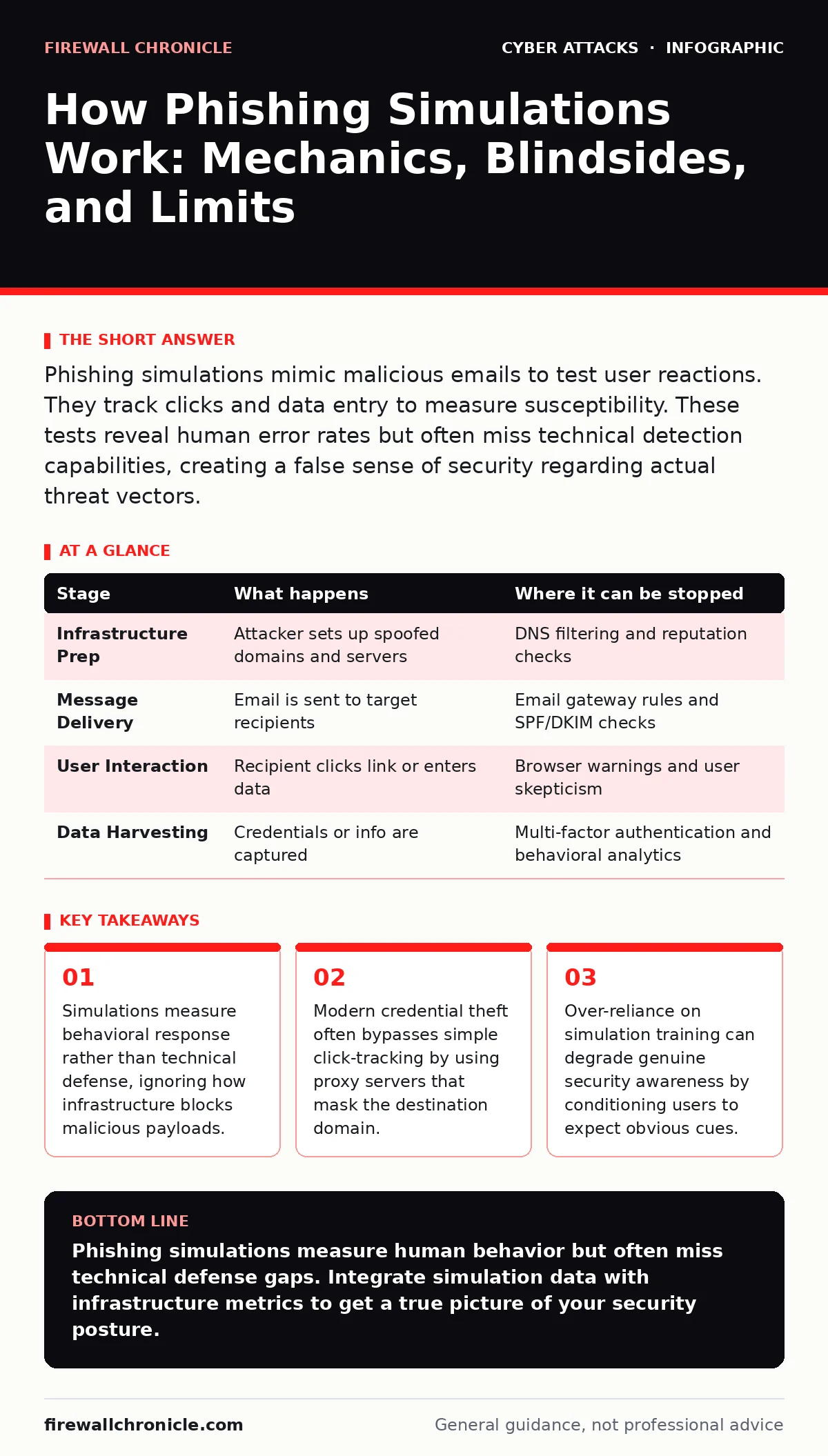
Phishing simulations mimic malicious emails to test user reactions. They track clicks and data entry to measure susceptibility. These tests reveal human error rates but often miss technical detection capabilities, creating a false sense of security regarding actual threat vectors.
The Anatomy of a Simulation Campaign
Phishing simulations are controlled exercises designed to measure how users respond to deceptive messages. Organizations deploy these tests to identify gaps in human behavior before real attackers exploit them. The process mimics the initial stages of a social engineering attack without causing actual harm. You send a crafted email that appears legitimate to gauge whether recipients recognize the deception.
The goal is not to trick users for the sake of it, but to collect data on reaction times and reporting rates. This data informs training programs and policy adjustments. However, the simulation environment differs significantly from the chaotic reality of a live attack. Real adversaries adapt their tactics based on your defenses, whereas simulations often follow a static script.
Stage 1: Infrastructure Preparation
The attacker, or in this case the security team, first establishes the technical foundation for the simulation. This involves setting up a server that mimics a trusted domain. The server must be configured to handle web traffic and potentially host login pages. DNS records are manipulated to point the simulation domain to this controlled infrastructure.
This stage is often overlooked in basic training discussions. The complexity here determines how realistic the simulation feels. If the setup lacks proper SSL certificates or uses suspicious IP addresses, technical users will dismiss the email immediately. This creates a bias where only less technical users fall for the test.
| Stage | What happens | Where it can be stopped |
|---|---|---|
| Infrastructure Prep | Attacker sets up spoofed domains and servers | DNS filtering and reputation checks |
| Message Delivery | Email is sent to target recipients | Email gateway rules and SPF/DKIM checks |
| User Interaction | Recipient clicks link or enters data | Browser warnings and user skepticism |
| Data Harvesting | Credentials or info are captured | Multi-factor authentication and behavioral analytics |
Stage 2: Message Crafting and Delivery
The next phase involves creating the deceptive message. The content must align with the target’s expectations, using familiar branding and language. The subject line is engineered to create urgency or curiosity, prompting immediate action. The email body contains a call-to-action, usually a hyperlink or an attachment.
Delivery mechanisms vary in sophistication. Simple simulations use standard SMTP protocols, which can be blocked by modern email gateways. More advanced tests may bypass these filters by compromising legitimate accounts or using compromised third-party services. This mirrors how real attackers use watering hole attacks to distribute malware to users of trusted sites.
Stage 3: The Click and the Proxy
When the user clicks the link, they are redirected to the simulation server. In many basic tests, this redirect is direct and obvious. However, real attackers often use intermediate proxy servers to hide their true location. This technique makes it difficult for security tools to identify the malicious domain.
The proxy server intercepts the connection and forwards it to the final destination. To the user, the address bar may still show the trusted domain name. This is a form of man-in-the-middle attacks where the proxy acts as an invisible intermediary. Simulations that do not account for this technical nuance fail to test the effectiveness of browser security features.
Stage 4: Credential Harvesting
If the simulation involves a login page, the user is presented with a replica of a known service. The page requests credentials, just as the legitimate service would. The user enters their username and password, believing they are authenticating. The simulation server records this input and may even provide a success message to maintain the illusion.
This stage highlights a critical limitation of hardware security keys. While these devices protect against many forms of credential theft, they do not prevent the initial submission of a password if the user is tricked into bypassing the second factor. Simulations often fail to test this specific interaction, leaving a blind spot in the organization’s defense strategy.
See also: Angler Phishing Mechanics: How Attackers Hijack Support Threads
Stage 5: Data Analysis and Reporting
After the campaign ends, the collected data is analyzed. Metrics include click-through rates, credential submission rates, and time-to-report. These numbers provide a quantitative measure of user susceptibility. The results are often segmented by department, role, or tenure to identify high-risk groups.
However, these metrics can be misleading. A low click rate does not necessarily mean users are vigilant; it may mean the email was filtered out by security tools. Conversely, a high click rate might indicate that the simulation was too obvious, failing to replicate real-world stealth. This disconnect between simulation metrics and real-world risk is a significant challenge.
Stage 6: Training and Remediation
The final stage involves using the insights to improve security awareness. Users who fall for the simulation receive targeted training. The content of this training is tailored to the specific mistakes made during the test. The goal is to reinforce correct behaviors and highlight the red flags that were missed.
This process creates a feedback loop. Over time, users become better at identifying simulated phishing attempts. However, this improvement may not translate to real attacks. Adversaries continuously evolve their tactics, while simulations often remain static. This gap can lead to complacency, where users feel confident despite facing novel threats.
The Hidden Costs of Simulation
Phishing simulations introduce unintended consequences that organizations often ignore. Frequent testing can lead to fatigue, where users become desensitized to security warnings. This desensitation reduces the effectiveness of genuine alerts and warnings. Users may start ignoring all suspicious messages, assuming they are just another test.
Additionally, simulations can erode trust in internal communications. If users frequently encounter fake emails from "IT" or "HR," they may hesitate to respond to legitimate requests. This friction slows down operations and creates confusion. The balance between testing and trust is delicate and often mishandled.
Technical Blind Spots
Most simulation platforms do not test the technical controls that block real attacks. They assume that if a user clicks, they are compromised. This ignores the role of email gateways, DNS filtering, and browser protections. In reality, many malicious links are blocked before the user even sees them.
Furthermore, simulations rarely test for rate limiting on login attempts. Real attackers use dictionary attacks to guess passwords, but simulations typically accept any input. This misses the opportunity to test the effectiveness of account lockout policies and anomaly detection systems. Understanding these technical defenses is as important as training users.
Key takeaways
- Simulations measure behavioral response rather than technical defense, ignoring how infrastructure blocks malicious payloads.
- Modern credential theft often bypasses simple click-tracking by using proxy servers that mask the destination domain.
- Over-reliance on simulation training can degrade genuine security awareness by conditioning users to expect obvious cues.
Phishing simulations measure human behavior but often miss technical defense gaps. Integrate simulation data with infrastructure metrics to get a true picture of your security posture.
Frequently asked questions
Do phishing simulations actually improve security?
They can improve user awareness, but only if the feedback loop is immediate and the training is relevant. Without proper follow-up, they may just create annoyance and fatigue.
How often should we run phishing simulations?
Frequency depends on your industry and risk profile. Monthly tests are common, but too frequent testing can lead to desensitization. Balance is key to maintaining vigilance.
Can simulations detect advanced persistent threats?
No. Simulations are designed to test basic human susceptibility. They do not replicate the sophisticated, multi-stage techniques used by advanced persistent threats.
What is the difference between simulation and real phishing?
Simulations are controlled and predictable. Real phishing is adaptive, stealthy, and often uses compromised infrastructure that is harder to detect.
How this guide was produced: written by the Firewall Chronicle editorial team with AI assistance, checked against the public references listed below, and reviewed when the facts change. See our editorial policy or report an error.