Kubernetes Network Policies: 9 FAQs on Pod Connectivity Rules
Network policies act as stateful firewalls for pods, meaning that blocking inbound traffic automatically blocks the return data for any established connection.
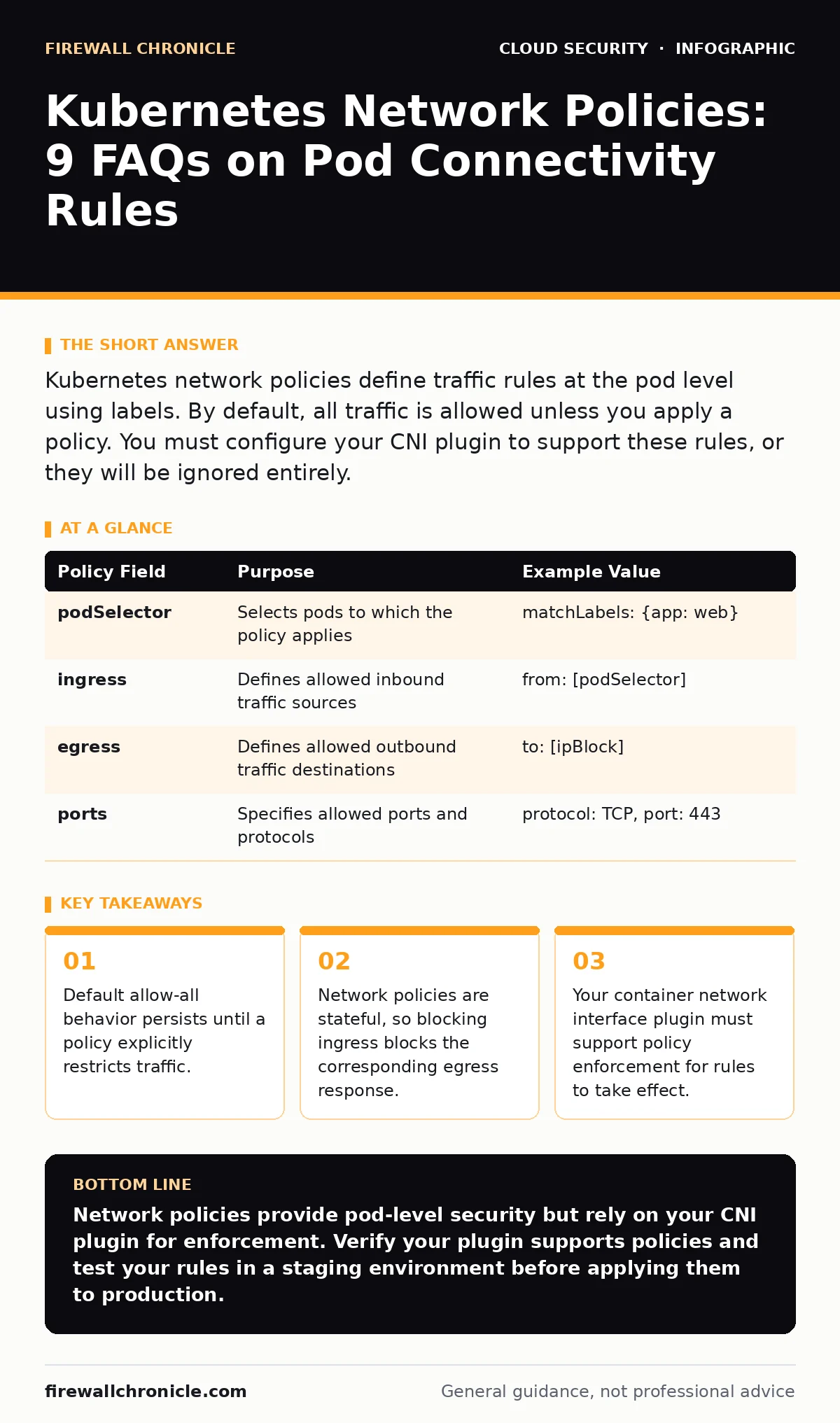
Kubernetes network policies define traffic rules at the pod level using labels. By default, all traffic is allowed unless you apply a policy. You must configure your CNI plugin to support these rules, or they will be ignored entirely.
Do network policies work by default?
No, they do not. In a standard Kubernetes cluster, the default behavior allows all traffic to flow between pods, nodes, and external services. You must explicitly create and apply a network policy to restrict this flow. Without a policy, your cluster operates with an open network perimeter.
This default state exists because Kubernetes separates the control plane from the data plane. The API server stores the policy definitions, but it does not enforce them. The enforcement happens at the node level through the container network interface plugin. If your plugin does not support policy enforcement, the rules you define will be stored but never applied.
What happens if I block inbound traffic?
Blocking inbound traffic also blocks the return traffic for any connection that was already established. Network policies in Kubernetes are stateful firewalls, not simple packet filters. When you deny ingress to a pod, the system drops packets coming into that pod. It also drops the response packets leaving that pod because they are part of the same connection state.
Imagine a web server that receives a request. If you apply a policy that denies ingress, the request is dropped. The server cannot send a response because the connection never completed. This means you do not need to write separate egress rules to stop the response; the stateful nature of the policy handles it automatically.
Which plugins support network policies?
You must use a container network interface plugin that implements the network policy API. Common options include Calico, Cilium, and Weave Net. Standard CNI plugins that only provide basic connectivity, like Flannel in its default configuration, do not enforce these rules.
If you are unsure if your plugin supports policies, check your cluster documentation. Some plugins require additional configuration to enable policy enforcement. Without this support, your security controls are invisible to the network stack. You can also explore Kubernetes security basics to understand how different components interact with the network layer.
How do I target specific pods?
You target pods using label selectors in the policy specification. The policy applies to every pod that matches the specified labels. You can also define peer selectors to match other pods, namespaces, or IP blocks.
For example, you can create a policy that applies to all pods with the label role: frontend. This policy can then restrict traffic to only come from pods with the label role: backend. This label-based approach allows you to manage security at a logical level rather than managing individual IP addresses.
| Policy Field | Purpose | Example Value |
|---|---|---|
| podSelector | Selects pods to which the policy applies | matchLabels: {app: web} |
| ingress | Defines allowed inbound traffic sources | from: [podSelector] |
| egress | Defines allowed outbound traffic destinations | to: [ipBlock] |
| ports | Specifies allowed ports and protocols | protocol: TCP, port: 443 |
Can I restrict traffic between namespaces?
Yes, you can use namespace selectors to allow or deny traffic between different namespaces. This is useful for isolating development, staging, and production environments. You can also combine namespace selectors with pod selectors for finer control.
Suppose you have a development namespace and a production namespace. You can create a policy in the production namespace that denies all ingress from the development namespace. This prevents accidental or malicious access from less secure environments. This form of cloud network segmentation helps contain potential breaches within a specific scope.
See also: Configuration Drift: How Small Teams Lose Cloud Control
Do network policies affect node ports?
Network policies apply to pod traffic, not directly to node port traffic. However, they do affect the traffic that reaches the pod through the node port. If a policy denies ingress to a pod, traffic arriving via a node port will also be blocked.
This is because the policy enforcement happens at the pod interface. The traffic enters the node, gets routed to the pod, and then hits the policy filter. If the filter denies the packet, it is dropped before the application sees it. This ensures that exposing services via node ports does not bypass your security controls.
How do I debug connectivity issues?
Start by checking if your CNI plugin is enforcing policies. Then, verify that your label selectors match the pods you intend to target. Use tools like kubectl exec to run network diagnostics from within a pod.
If you are still having issues, check the logs of your CNI plugin. Many plugins provide detailed logging for policy enforcement. You can also look at cloud migration security practices to ensure your network architecture is sound before applying complex rules.
Can I allow all traffic from a specific IP?
Yes, you can use IP blocks in the peer selectors of your policy. This allows you to permit traffic from specific external IP addresses or CIDR ranges. This is useful for allowing access from load balancers or external monitoring systems.
Imagine you have an external monitoring service that needs to check the health of your pods. You can create a policy that allows ingress from the IP address of the monitoring service. This keeps your cluster secure while allowing necessary external access.
Do policies persist across pod restarts?
Yes, network policies are stored in the Kubernetes API server. When a pod restarts, the CNI plugin re-applies the relevant policies to the new pod instance. This ensures that your security controls remain consistent even during rolling updates or failures.
However, if the CNI plugin daemon on a node crashes, it may take time to re-apply the policies. This is a hidden cost of using network policies: you rely on the health of the node agents.
How do policies interact with services?
Network policies apply to the pods backing a service, not the service itself. The service provides a stable IP and DNS name, but the policy enforcement happens at the pod level. This means you must ensure that your policies match the labels of the pods that the service selects.
If you change the labels of your pods, you must update your network policies accordingly. Otherwise, the policies will no longer apply to the correct pods. This can lead to unexpected connectivity issues. Understanding this interaction is key to Kubernetes security basics.
Key takeaways
- Default allow-all behavior persists until a policy explicitly restricts traffic.
- Network policies are stateful, so blocking ingress blocks the corresponding egress response.
- Your container network interface plugin must support policy enforcement for rules to take effect.
Network policies provide pod-level security but rely on your CNI plugin for enforcement. Verify your plugin supports policies and test your rules in a staging environment before applying them to production.
Frequently asked questions
Do network policies replace firewall rules?
No, they complement them. Network policies handle east-west traffic within the cluster, while traditional firewalls handle north-south traffic at the cluster perimeter.
Can I use network policies to prevent cryptojacking?
Yes, by restricting egress traffic to known destinations. This limits the ability of compromised pods to communicate with external mining pools, a common vector for **cloud cryptojacking**.
How do I test network policies?
Create a test namespace with two pods and a restrictive policy. Use `kubectl exec` to attempt connectivity between the pods and verify that the policy blocks or allows traffic as expected.
Do network policies work with multi-cluster setups?
It depends on the CNI plugin and the inter-cluster networking solution. Some plugins support global policies, while others require separate configuration for each cluster.
How this guide was produced: written by the Firewall Chronicle editorial team with AI assistance, checked against the public references listed below, and reviewed when the facts change. See our editorial policy or report an error.