Malicious Mobile Apps Explained: How Spyware Hides in Plain Sight
Most malicious mobile apps do not steal your data directly; they trick you into granting permissions that allow background processes to watch your every move.
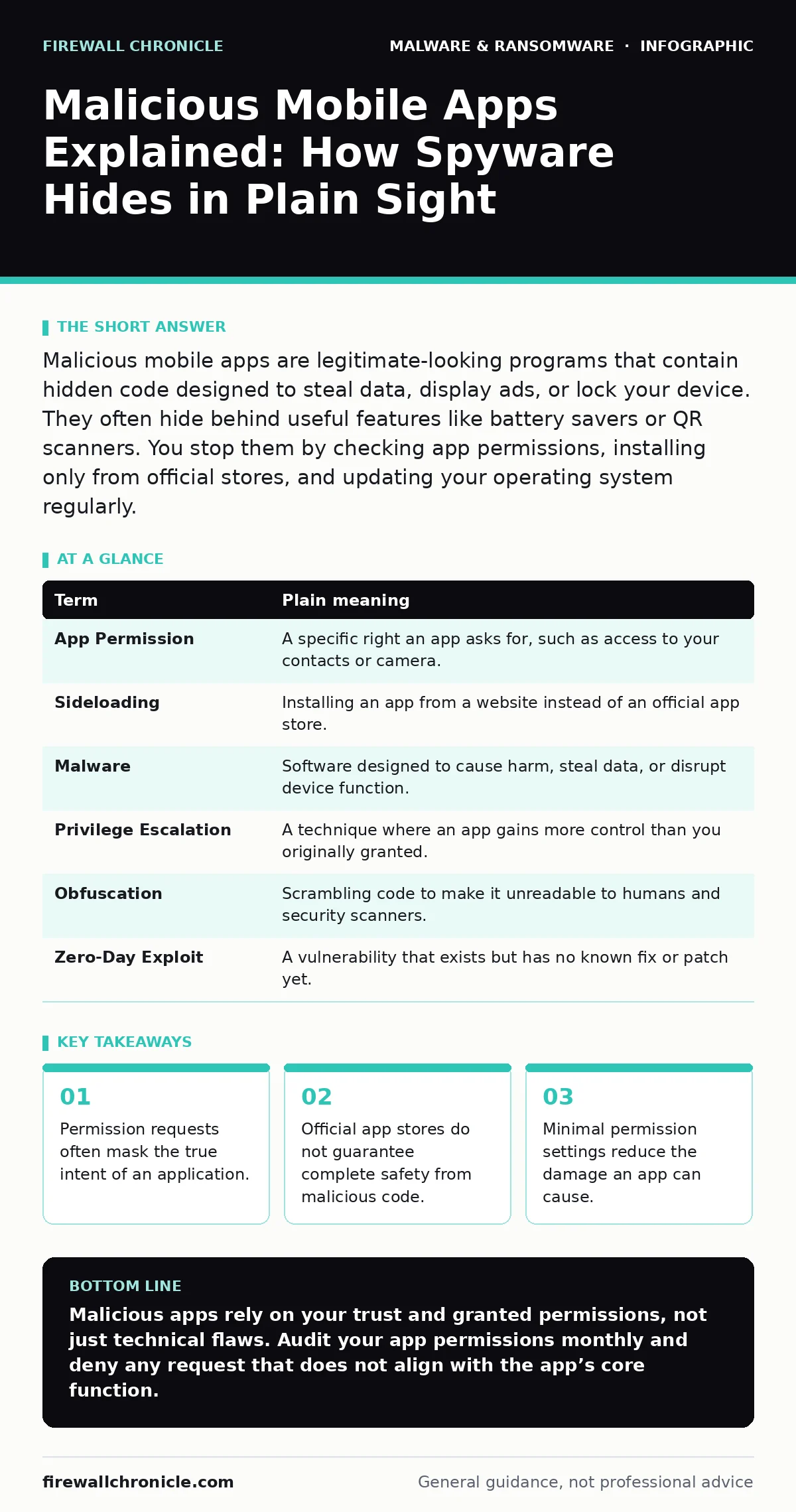
Malicious mobile apps are legitimate-looking programs that contain hidden code designed to steal data, display ads, or lock your device. They often hide behind useful features like battery savers or QR scanners. You stop them by checking app permissions, installing only from official stores, and updating your operating system regularly.
The Uninvited Houseguest Analogy
Imagine you invite a friend over to help you move furniture. This friend is polite and helpful at first. However, while you are distracted, they copy your house keys, take photos of your safe combination, and leave a hidden camera in your bedroom. They did not break in. You invited them in, and you gave them permission to be in your house. Malicious mobile apps operate on this exact principle. They do not hack your phone through a network breach. They rely on your trust and your clicks to gain access.
This analogy helps explain why traditional security measures often fail. You did not leave your door unlocked. You handed the key to the intruder. The problem is not the lock. The problem is the person holding the key. Understanding this shift in responsibility changes how you view every installation.
Key Terms for Mobile Security
To understand how these apps work, you must know the mechanisms they exploit. Developers use standard technical terms that hide the danger. The table below translates these concepts into plain language.
| Term | Plain meaning |
|---|---|
| App Permission | A specific right an app asks for, such as access to your contacts or camera. |
| Sideloading | Installing an app from a website instead of an official app store. |
| Malware | Software designed to cause harm, steal data, or disrupt device function. |
| Privilege Escalation | A technique where an app gains more control than you originally granted. |
| Obfuscation | Scrambling code to make it unreadable to humans and security scanners. |
| Zero-Day Exploit | A vulnerability that exists but has no known fix or patch yet. |
How Malware Hides in Plain Sight
Most users assume that official app stores are safe. They are not. Store algorithms prioritize download volume and user ratings. A malicious app can buy fake reviews to appear popular. Once installed, it may start as a harmless utility, such as a flashlight or a PDF scanner. After a few days, it updates silently. The update contains the malicious payload. This delay bypasses initial automated scans.
Developers often bundle malicious code with legitimate functionality. The app does what it promises. It also does what it hides. This dual nature makes detection difficult. Your phone does not know the difference between a helpful feature and a spy tool. It only sees that you granted permission.
The Hidden Cost of Convenience
Consider a free battery-saving app. It promises to extend your battery life. To do this, it needs permission to monitor other apps. This permission allows it to see when you open your banking app. It can then record your screen or keystrokes. You traded privacy for a small convenience. The trade-off is rarely visible.
This is similar to how remote access trojans operate on computers. They often arrive disguised as useful tools. The user wants the benefit. The attacker wants the access. The permission you grant is the bridge between your goal and their goal. You must evaluate every permission request against the app’s stated purpose. Does a flashlight app need access to your location? No. Deny it.
Why Official Stores Fail
App stores use automated scanners to detect known malware signatures. These scanners look for patterns that match existing threats. They are excellent at catching known bad actors. They are poor at catching new, custom code. A developer can change the variable names and structure of their code. The scanner sees a new pattern. It approves the app.
This is why rootkits are so dangerous on mobile devices. A rootkit hides its presence from the operating system. It can make itself invisible to security tools. Even if you install a reputable antivirus, the rootkit may remain undetected. It operates at a level where the phone’s own security checks are bypassed.
Simple Safety Habits for Users
You can reduce your risk without becoming a security expert. The goal is to limit the surface area for attack. This is known as attack surface reduction rules in enterprise environments. You can apply these rules to your phone.
- Audit Permissions Monthly: Open your phone settings. Review every app. Revoke permissions that do not make sense. If a game asks for access to your contacts, remove it.
- Disable Unknown Sources: Ensure your phone blocks installations from outside the official store. This prevents sideloading of unvetted apps.
- Check for Updates: Update your operating system and apps immediately. Updates often patch vulnerabilities that tamper protection systems rely on.
These steps are not about stopping every attack. They are about making it harder for attackers to succeed. Most malware targets low-effort opportunities. If you close the easy doors, they move on to easier targets.
When to Worry More
Some apps are riskier than others. Utilities that modify system behavior, such as cleaners or boosters, require high-level permissions. These are prime targets for scareware. Scareware tricks you into thinking your phone is broken. It then sells you a fake solution. The fake solution is often more malware.
Be cautious with apps that offer "too good to be true" benefits. Free unlimited data, cracked software, or exclusive media are common lures. These apps often contain browser hijackers or cryptojacking code. They use your device’s power to mine cryptocurrency or change your search results. The cost is your battery life and your privacy.
The Reality of Mobile Protection
No single measure stops all malicious apps. Software restriction policies used in corporate environments block all unapproved software. You cannot use this on a personal phone. You must balance security with usability.
The most effective defense is skepticism. Question every permission. Question every update. Question every download. Your phone is a powerful device. Treat it like a bank vault, not a toy box. The keys are in your hands. Use them wisely.
Key takeaways
- Permission requests often mask the true intent of an application.
- Official app stores do not guarantee complete safety from malicious code.
- Minimal permission settings reduce the damage an app can cause.
Malicious apps rely on your trust and granted permissions, not just technical flaws. Audit your app permissions monthly and deny any request that does not align with the app’s core function.
Frequently asked questions
Can a virus spread from phone to phone via Bluetooth?
Bluetooth transmission is rare for modern malware. Most infections occur through app installations or malicious links in messages, not direct device-to-device scanning.
Do I need antivirus software on my phone?
Mobile operating systems have built-in security. Antivirus apps add a layer of scanning but can slow down your device. Good habits are more effective than extra software.
Is it safe to install apps from third-party websites?
No. Third-party sites lack the verification processes of official stores. They are common sources of modified apps that contain hidden malicious code.
How do I know if my phone is already infected?
Look for sudden battery drain, unexpected data usage, or new apps you did not install. These signs indicate background processes are running without your consent.
How this guide was produced: written by the Firewall Chronicle editorial team with AI assistance, checked against the public references listed below, and reviewed when the facts change. See our editorial policy or report an error.