How DMARC Stops Email Spoofing: A Practical Setup Guide
DMARC turns email authentication failures into automatic rejections, preventing attackers from impersonating your domain even if they bypass basic checks.
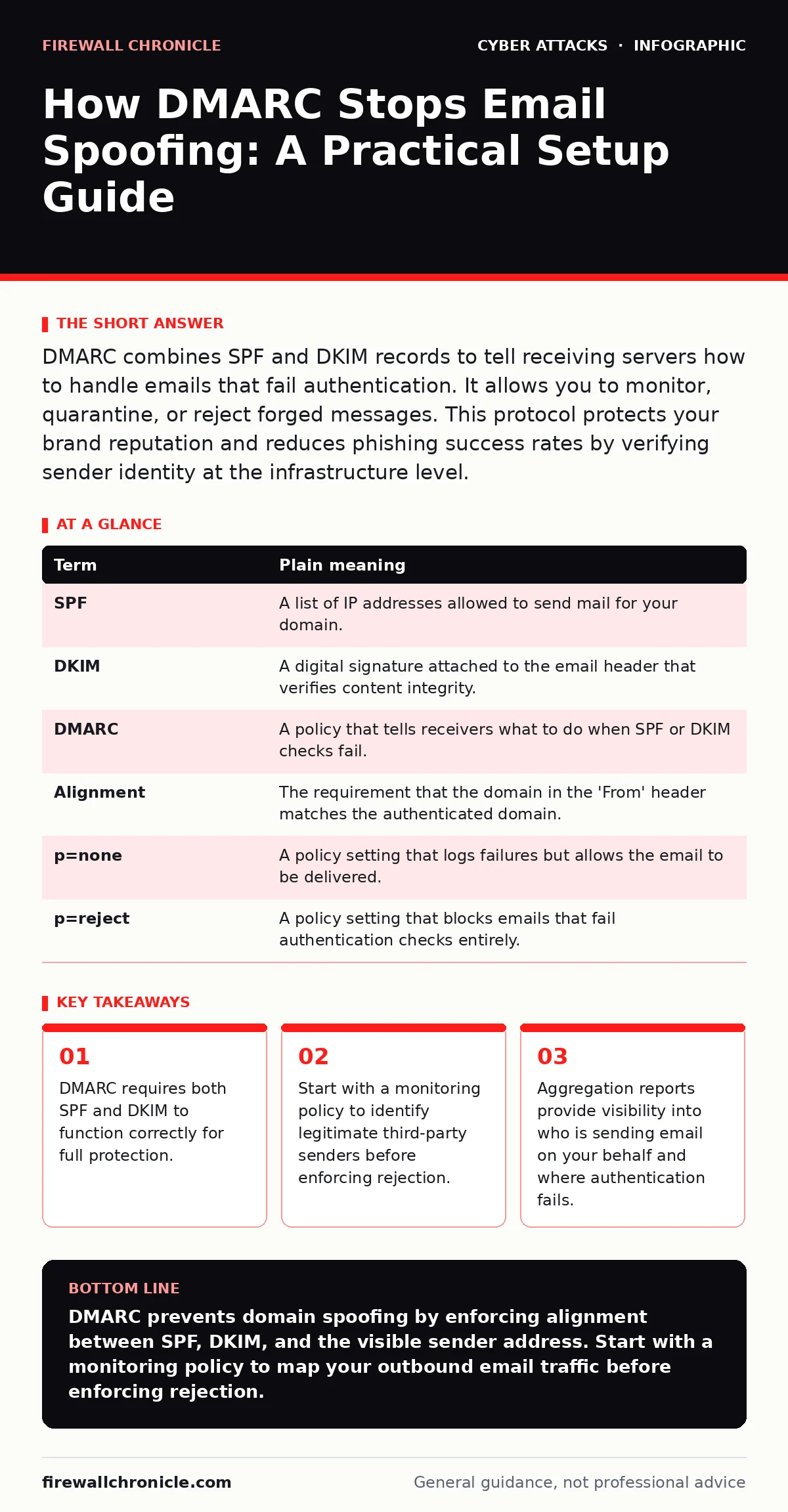
DMARC combines SPF and DKIM records to tell receiving servers how to handle emails that fail authentication. It allows you to monitor, quarantine, or reject forged messages. This protocol protects your brand reputation and reduces phishing success rates by verifying sender identity at the infrastructure level.
The Courier Analogy for Email Identity
Imagine you run a secure delivery service. You issue official uniforms to your couriers. Anyone wearing the uniform is trusted. Attackers know this. They steal uniforms or sew fake ones. Customers receive packages from imposters. They assume the package is legitimate because it looks correct. DMARC changes this dynamic. It requires couriers to show two things: a valid ID badge and a sealed manifest. If either is missing, the recipient knows the delivery is not from your company.
Key Terms and Their Plain Meanings
Understanding the mechanics requires knowing the building blocks. These three protocols work together to verify sender identity.
| Term | Plain meaning |
|---|---|
| SPF | A list of IP addresses allowed to send mail for your domain. |
| DKIM | A digital signature attached to the email header that verifies content integrity. |
| DMARC | A policy that tells receivers what to do when SPF or DKIM checks fail. |
| Alignment | The requirement that the domain in the 'From' header matches the authenticated domain. |
| p=none | A policy setting that logs failures but allows the email to be delivered. |
| p=reject | A policy setting that blocks emails that fail authentication checks entirely. |
Why SPF Alone Is Not Enough
SPF checks the sending server’s IP address. It answers the question: is this server allowed to send mail for this domain? It does not protect the email body. Attackers can use an allowed server but change the content. DKIM adds a cryptographic signature. It proves the message was not altered in transit. However, DKIM can be applied by any server that holds the private key. Without DMARC, a receiver might accept an email that passes DKIM but fails SPF, or vice versa. DMARC requires alignment. The domain in the visible 'From' address must match the domain that passed SPF or DKIM. This stops attackers from using a subdomain to bypass checks.
The Hidden Cost of Immediate Rejection
Many administrators jump straight to a reject policy. This seems like the strongest defense. It often breaks legitimate email flows. Marketing platforms, HR systems, and cloud applications often send mail using different infrastructure. If you reject all unauthenticated mail, these services fail. Users miss critical notifications. Support tickets increase. The hidden cost is operational disruption. You must map all outbound email sources first. Use a monitoring policy to see what is happening. Identify which third-party services send mail on your behalf. Configure them to align with your domain. Only then should you enforce rejection.
Setting Up DMARC Step by Step
You need to publish a DNS record. This record contains your policy and contact information.
- Create SPF and DKIM records for your domain. Verify they are working correctly.
- Publish a DMARC record with a policy of "none". This enables monitoring without blocking mail.
- Review aggregation reports for 2 to 4 weeks. Identify legitimate senders and configure them to align.
- Change the policy to "quarantine". This moves failing emails to the spam folder.
- Monitor again. Ensure no legitimate mail is quarantined.
- Switch the policy to "reject". This blocks failing emails completely.
Interpreting Aggregation Reports
DMARC generates XML reports. These reports come from receiving servers like Gmail or Outlook. They show who sent mail, how many messages were sent, and whether they passed authentication. You do not need to read every line. Look for source IPs that fail authentication. If you recognize the IP, update your SPF or DKIM settings. If you do not recognize it, you have found a spoofing attempt. This data is actionable. It reveals compromise or misconfiguration. It also helps you identify unauthorized third-party usage.
Common Pitfalls and Edge Cases
Forwarding breaks alignment. When an email is forwarded, the original headers may be stripped or altered. The forwarding server adds its own signature. The domain in the 'From' header may no longer match the DKIM signature. This causes a DMARC failure. You can solve this by using DMARC-aware forwarding services. These services preserve the original headers. They also re-sign the message with the correct key. Another pitfall is subdomain usage. If you use a subdomain for marketing, you must publish a DMARC record for that subdomain. The parent domain policy does not automatically apply to subdomains unless you specify it.
Maintaining Your Configuration
Email infrastructure changes. New applications are added. Old ones are retired. You must update your DNS records accordingly. Regular review prevents gaps. Monitor your reports continuously. If you see a spike in failures, investigate immediately. It could indicate a compromised account. It could also indicate a misconfigured application. Keep your private keys secure. If a DKIM key is exposed, rotate it immediately. Update the DNS record with the new public key. This process ensures long-term integrity.
Key takeaways
- DMARC requires both SPF and DKIM to function correctly for full protection.
- Start with a monitoring policy to identify legitimate third-party senders before enforcing rejection.
- Aggregation reports provide visibility into who is sending email on your behalf and where authentication fails.
DMARC prevents domain spoofing by enforcing alignment between SPF, DKIM, and the visible sender address. Start with a monitoring policy to map your outbound email traffic before enforcing rejection.
Frequently asked questions
Does DMARC protect my inbox from spam?
DMARC primarily protects your domain from being impersonated. It helps receivers filter out spoofed mail, which reduces spam containing your domain name, but it does not filter all spam types.
Can I use DMARC without SPF or DKIM?
No. DMARC relies on SPF and DKIM to authenticate the sender. Without both, DMARC cannot determine if an email is legitimate and will not enforce any policy.
How long does it take to set up DMARC?
Publishing the DNS record takes minutes. However, the full process of monitoring, aligning third-party senders, and enforcing rejection typically takes several weeks to ensure no legitimate mail is blocked.
What happens if an email fails DMARC?
The action depends on your policy. With "none," it is delivered but logged. With "quarantine," it goes to spam. With "reject," the receiving server blocks it entirely.
How this guide was produced: written by the Firewall Chronicle editorial team with AI assistance, checked against the public references listed below, and reviewed when the facts change. See our editorial policy or report an error.