CAPTCHA Security: Benefits, Limitations, and Real-World Trade-offs
CAPTCHAs shift the cost of an attack to the attacker but often degrade user experience and fail against sophisticated automated solving services.
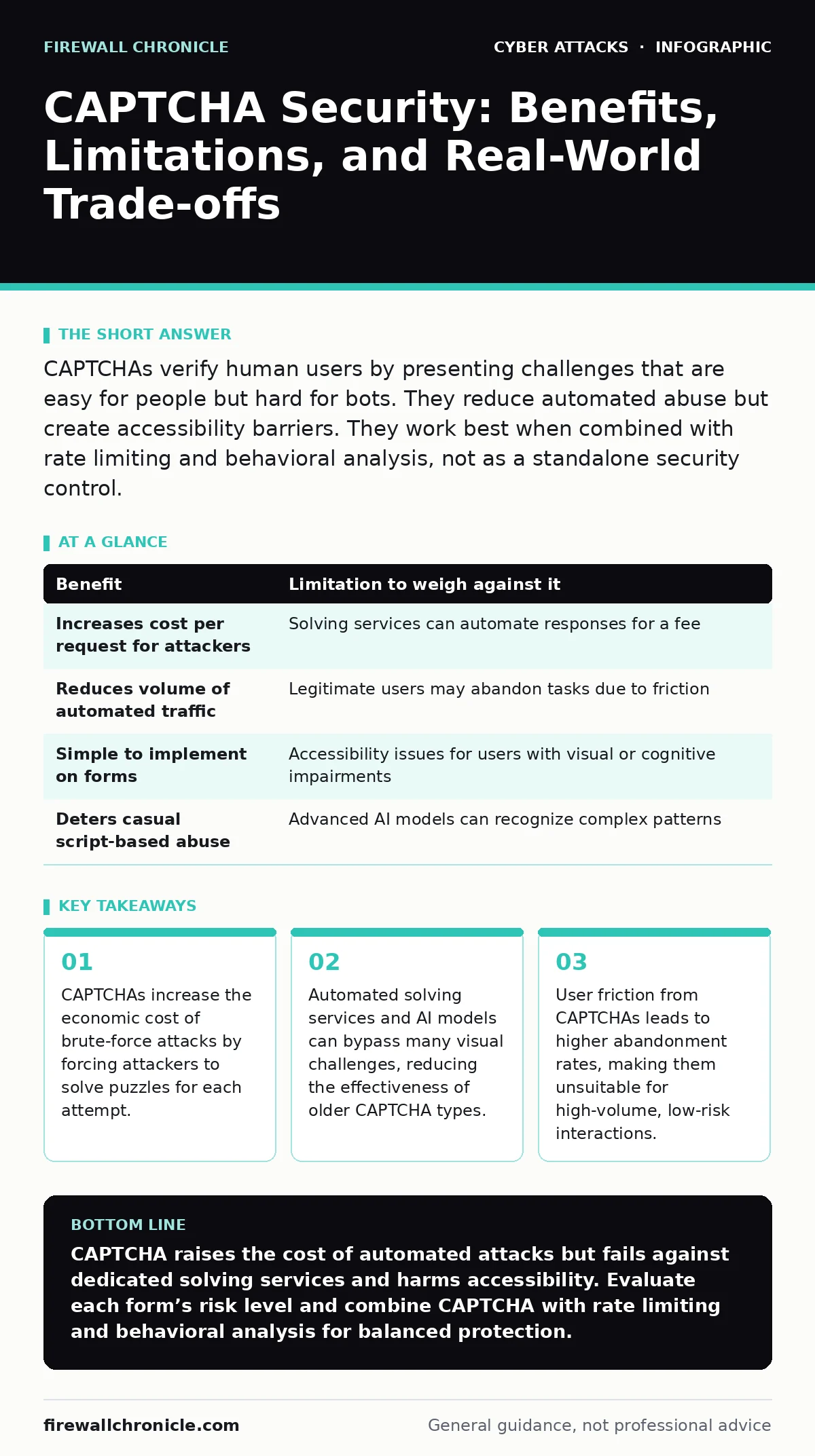
CAPTCHAs verify human users by presenting challenges that are easy for people but hard for bots. They reduce automated abuse but create accessibility barriers. They work best when combined with rate limiting and behavioral analysis, not as a standalone security control.
How CAPTCHA Mechanisms Verify Human Presence
CAPTCHA, which stands for Completely Automated Public Turing test to tell Computers and Humans Apart, relies on cognitive tasks that are trivial for humans but difficult for automated software. The most common form presents distorted text or image recognition tasks. The mechanism works by introducing a deliberate bottleneck in the request flow. A bot must pause, render the challenge, attempt to solve it, and submit the result before the server processes the actual request. This delay disrupts high-speed automated scripts that rely on volume to overwhelm systems.
The underlying assumption is that solving the puzzle requires human perception or reasoning. Early implementations used distorted alphanumeric strings. Modern versions use image selection, such as identifying traffic lights or crosswalks. Some newer approaches analyze mouse movements and timing data to infer human behavior without presenting a visible puzzle. Each method attempts to balance security with user convenience. The goal is to create a barrier that is high enough to deter casual automation but low enough to keep legitimate users engaged.
The Economic Barrier to Automated Abuse
The primary benefit of CAPTCHA is the imposition of an economic cost on the attacker. Automated attacks often rely on speed and volume. By inserting a challenge, you force the attacker to spend time and computational resources on each request. This turns a high-volume, low-cost attack into a low-volume, high-cost operation. For credential stuffing or brute-force attacks, this reduction in throughput can render the attack economically unviable. The attacker must weigh the potential gain against the increased resource expenditure.
This cost shift is particularly effective against generic, large-scale campaigns. Attackers targeting many sites simultaneously cannot afford to solve unique challenges for each interaction. The CAPTCHA acts as a rate limiter that is enforced at the application layer. It does not stop the attack entirely but raises the threshold of effort required to achieve a meaningful result. This makes small-scale or opportunistic attacks less attractive. The defender gains time to detect anomalies and respond to emerging threats.
| Benefit | Limitation to weigh against it |
|---|---|
| Increases cost per request for attackers | Solving services can automate responses for a fee |
| Reduces volume of automated traffic | Legitimate users may abandon tasks due to friction |
| Simple to implement on forms | Accessibility issues for users with visual or cognitive impairments |
| Deters casual script-based abuse | Advanced AI models can recognize complex patterns |
The Rise of Automated Solving Services
The limitation of CAPTCHA lies in its vulnerability to external solving services. These services employ large workforces or advanced artificial intelligence to solve puzzles at scale. An attacker’s bot sends the CAPTCHA image to the service, which returns the solution within seconds. This turns the CAPTCHA from a barrier into a minor transaction cost. The attacker pays a small fee per solution, which is often less than the value gained from successful unauthorized access. This market for solving services undermines the security promise of visual challenges.
Artificial intelligence has further eroded the effectiveness of image-based CAPTCHAs. Machine learning models trained on vast datasets can recognize objects and patterns with high accuracy. Some models can even interpret distorted text that was designed to be unreadable by computers. The arms race between CAPTCHA providers and AI developers continues, but the trend favors the attackers. As AI capabilities improve, the gap between human and machine performance narrows. Relying solely on visual recognition is no longer a robust defense strategy.
Accessibility and User Experience Friction
CAPTCHAs create significant barriers for users with disabilities. Visual challenges are inaccessible to blind or visually impaired users. Audio alternatives exist but are often difficult to understand due to background noise or distortion. Cognitive challenges can frustrate users with neurological conditions. This friction affects not only disabled users but also those with slower internet connections or older devices. The result is a degraded user experience that can lead to higher abandonment rates. If a user cannot complete a task easily, they may leave the site entirely.
The cumulative effect of frequent CAPTCHA prompts is user fatigue. Legitimate users who encounter puzzles repeatedly may perceive the site as hostile or untrustworthy. This is particularly damaging for e-commerce or subscription services where conversion rates are critical. The trade-off between security and usability is not always linear. In some cases, the loss of legitimate business outweighs the security benefit. Developers must evaluate the risk profile of each interaction. Not every form submission requires the same level of verification.
When CAPTCHA Is Worth Implementing
CAPTCHA is worth implementing when the cost of a successful automated attack is high. Login pages, password reset forms, and financial transactions are prime candidates. These interactions involve sensitive data or privileged actions. A brute-force attack on a login page can compromise user accounts, leading to data breaches and reputational damage. Here, the friction introduced by CAPTCHA is justified by the potential harm. The economic barrier prevents attackers from testing thousands of credentials quickly.
It is also appropriate for user-generated content forms. Comment sections, registration pages, and contact forms are often targets for spam and abuse. CAPTCHA reduces the volume of automated submissions, keeping these areas usable for legitimate users. The key is to apply CAPTCHA selectively. Use it only on high-value or high-risk endpoints. Avoid placing it on every page or form. This targeted approach minimizes user friction while maximizing security. Combine it with other controls like IP reputation checks and behavioral analysis for better results.
When CAPTCHA Is Not the Right Choice
CAPTCHA is not worth it for low-risk, high-volume interactions. Product searches, content browsing, and newsletter sign-ups typically do not require strict human verification. The friction introduced by CAPTCHA can significantly reduce conversion rates. In these cases, the business impact of lost users outweighs the security benefit. Use less intrusive methods like rate limiting or hidden fields to detect bots. These techniques can filter out obvious automated traffic without annoying legitimate users.
It is also unsuitable for environments where accessibility is a legal or ethical requirement. If your audience includes a significant number of users with disabilities, CAPTCHA may exclude them. This can lead to compliance issues and lost market share. Explore alternative verification methods that are more inclusive. Behavioral analysis, which examines how a user interacts with the interface, can often distinguish humans from bots without explicit challenges. This approach is less intrusive and more accessible.
Integrating CAPTCHA with Broader Security Controls
CAPTCHA should never operate in isolation. It is one component of a broader security strategy. Combine it with rate limiting to enforce limits on the number of requests per user or IP address. This creates two layers of defense. Rate limiting handles the volume, while CAPTCHA handles the intent. This combination is more effective than either method alone. It also reduces the load on CAPTCHA services, lowering costs and improving performance.
Consider integrating CAPTCHA with multi-factor authentication. For high-risk actions, require both a password and a second factor. This adds an additional layer of security that is difficult for attackers to bypass. Even if an attacker solves the CAPTCHA, they still need the second factor. This approach aligns with defense-in-depth principles. It ensures that a single point of failure does not compromise the entire system. Regularly review and update your security controls to address new threats.
Evaluating Alternatives to Visual Challenges
As visual CAPTCHAs become less effective, consider alternative verification methods. Behavioral analysis examines mouse movements, keystroke dynamics, and touch patterns. These signals are difficult for bots to replicate accurately. This method is transparent to the user, requiring no explicit action. It provides a seamless experience while maintaining security. However, it requires sophisticated analysis tools and may have higher false-positive rates.
Another alternative is invisible CAPTCHA, which runs in the background. It analyzes user behavior and only presents a challenge if suspicious activity is detected. This approach minimizes friction for legitimate users while catching bots. It relies heavily on accurate behavioral models. If the models are poorly calibrated, legitimate users may still face challenges. Test these solutions thoroughly to ensure they balance security and usability effectively.
Key takeaways
- CAPTCHAs increase the economic cost of brute-force attacks by forcing attackers to solve puzzles for each attempt.
- Automated solving services and AI models can bypass many visual challenges, reducing the effectiveness of older CAPTCHA types.
- User friction from CAPTCHAs leads to higher abandonment rates, making them unsuitable for high-volume, low-risk interactions.
CAPTCHA raises the cost of automated attacks but fails against dedicated solving services and harms accessibility. Evaluate each form’s risk level and combine CAPTCHA with rate limiting and behavioral analysis for balanced protection.
Frequently asked questions
Does CAPTCHA stop all bots?
No, CAPTCHA slows down bots and increases their cost, but sophisticated bots using AI or human-solving services can bypass it.
Is invisible CAPTCHA more secure?
Invisible CAPTCHA is often more user-friendly but relies on behavioral signals that can be spoofed by advanced emulators.
How does CAPTCHA affect accessibility?
Visual CAPTCHAs are difficult for blind users, and audio versions can be hard to understand, creating barriers for people with disabilities.
Can I use CAPTCHA for API security?
CAPTCHA is designed for browser-based interactions. For APIs, use API keys, rate limiting, and token-based authentication instead.
How this guide was produced: written by the Firewall Chronicle editorial team with AI assistance, checked against the public references listed below, and reviewed when the facts change. See our editorial policy or report an error.